
Evaluations
An eval set is a saved test of your search quality: named cases pinned to one version of your data, scored by a judge, giving one number — the pass rate.
- A case is one real search — “waterproof running jacket” — with its own standard for a good result.
- A judge is an AI model that reads each result and decides pass or fail against that standard, billed to your own API key.
- Pin a version, then measure every change against it — a new embedding model, a reranker, re-imported records, a setting moved from test to production. If the rate falls, the change hurt quality.
What an eval set is
An eval set is a saved relevance test — a handful of named cases, one real search each, pinned to one version of your data and scored on your own API key. Run it and you get a single number, the pass rate. Run it again after any change and compare. It lives under Insights → Evaluations.
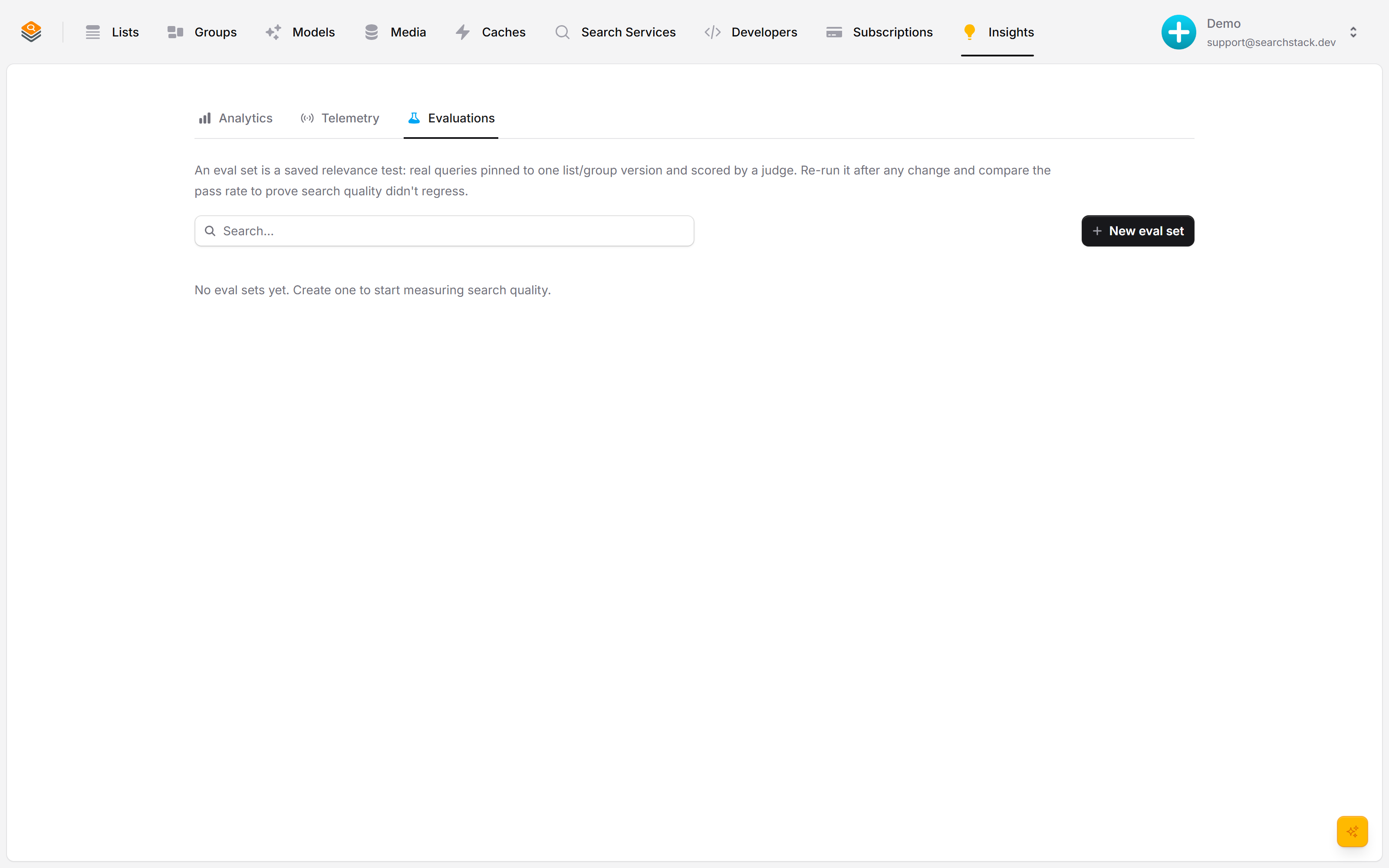
Create a set
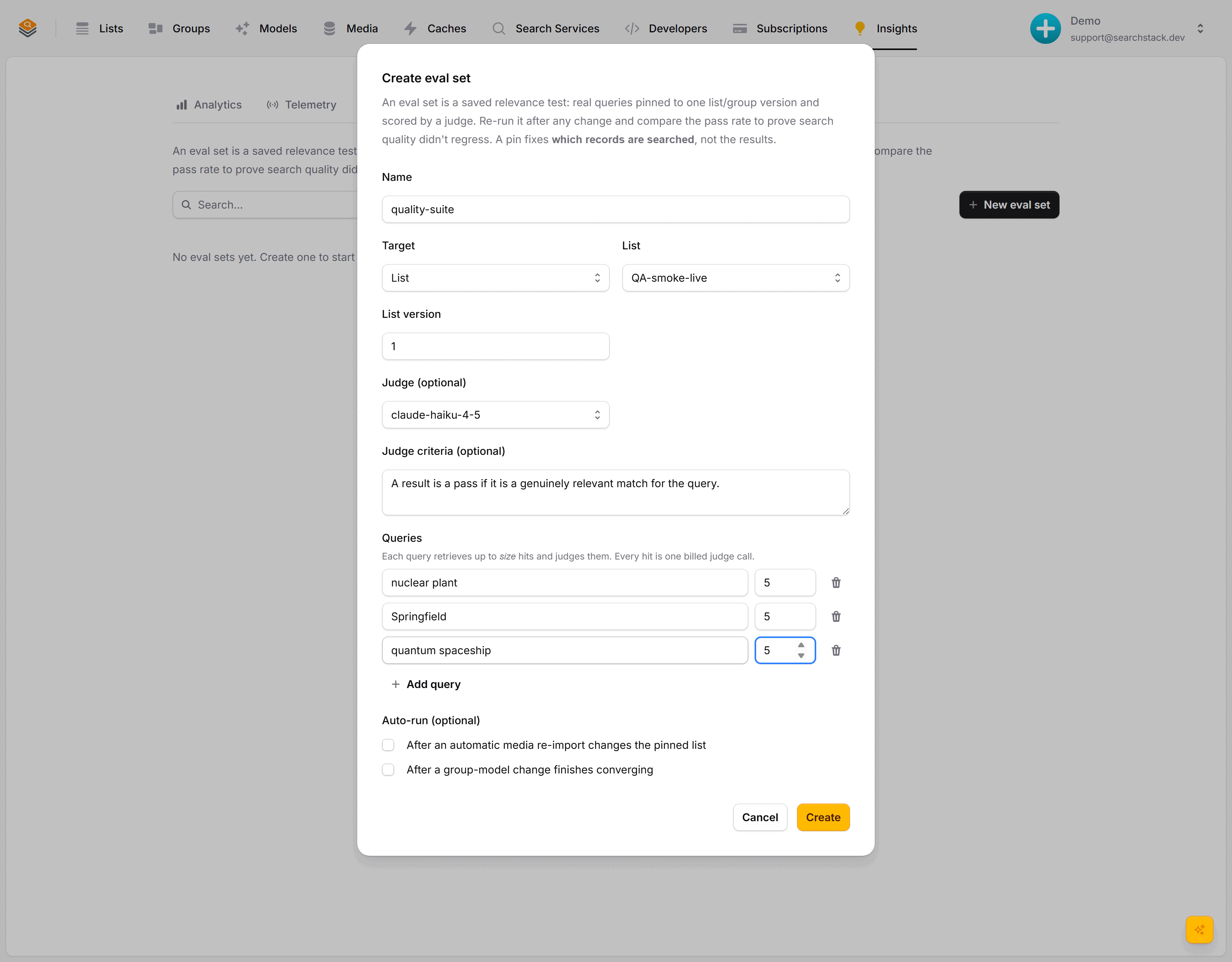
Pin a target (a list or group version), pick the saved API key that pays for the grading, and write what a pass means by default. The set is created empty — you add its cases next, so the form never grows with the test.
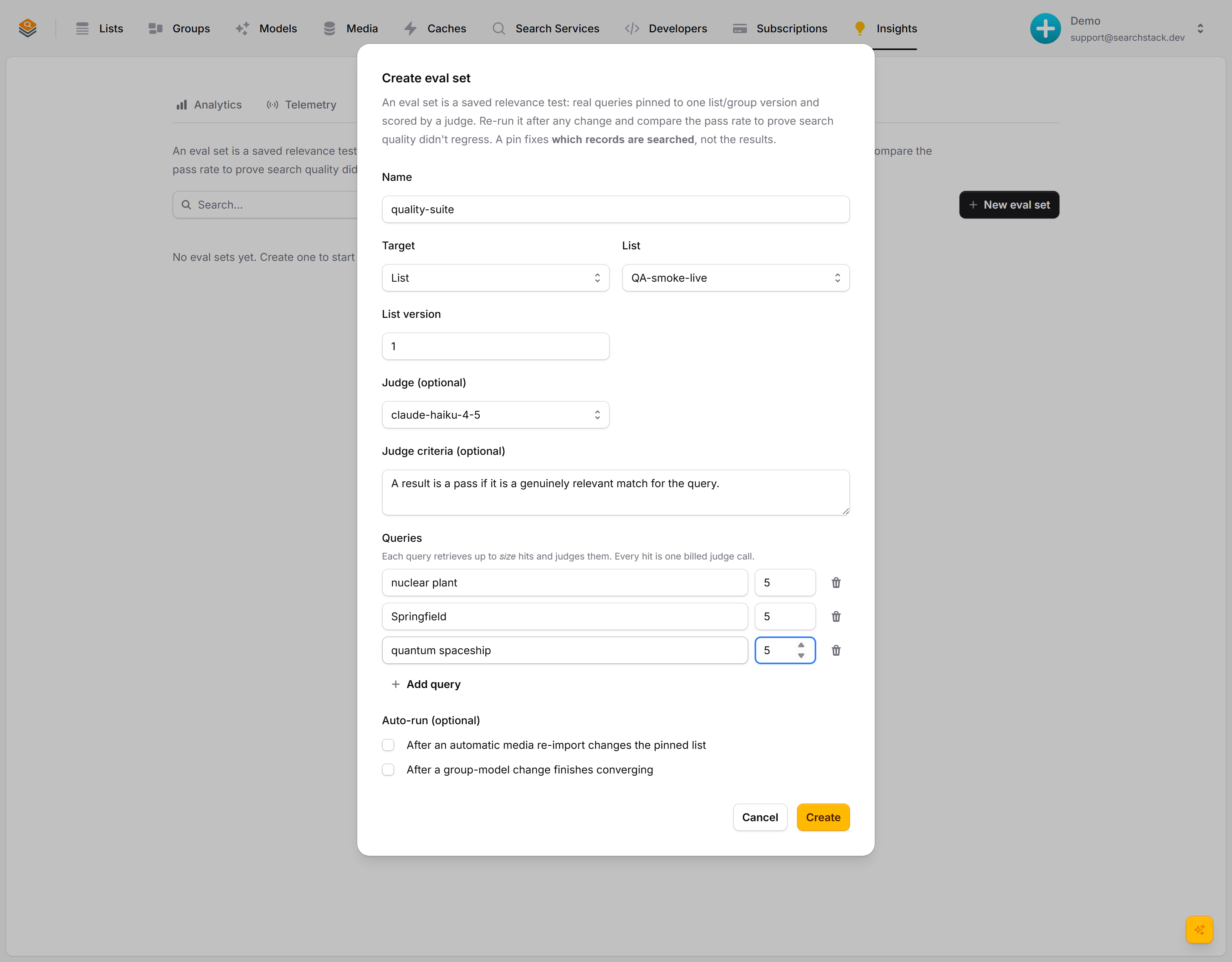
Your saved tests, in one place
Each set shows what it pins, how it is scored, and how many cases it runs. Open its … menu and choose Cases to add one — a search plus the bar for that search. Think of it as a health check you can re-run any time — by hand, or automatically when your data changes.
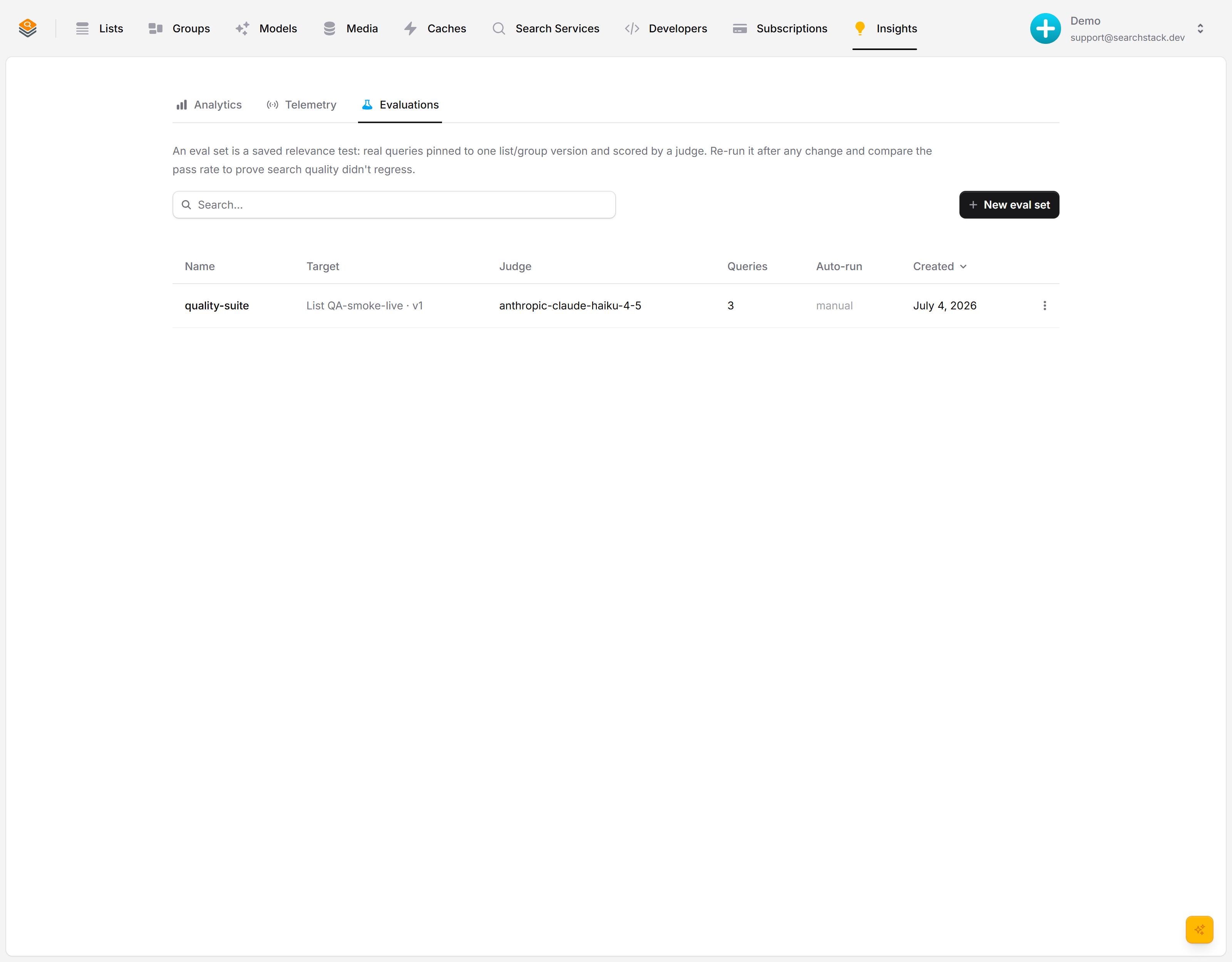
See the cost before you run
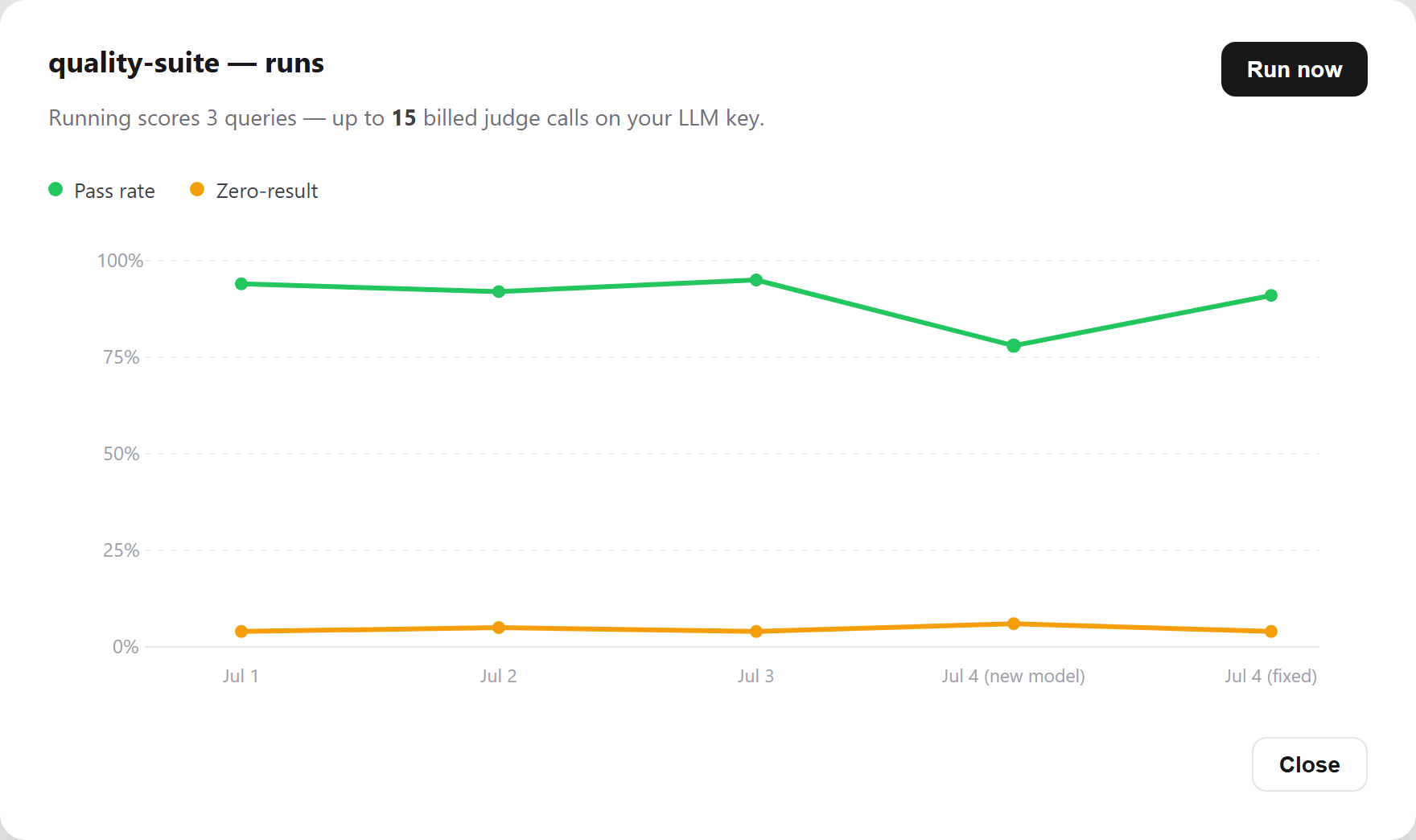
Open Runs & history and it tells you the cost up front — how many judge calls this run will make on your key — before you commit. Hit Run now and it scores every search in the background.
Catch a regression as a number
Every run plots a point. Here quality held around 94%, then a new embedding model dropped it to 78% — caught by the next run — and the fix brought it back. That is the whole point: you see a regression as a number, before your users feel it. (Illustrative trend.)
Auto-plays · use Back / Next to step through at your own pace.
A set and its cases
| What it is | What it holds | |
|---|---|---|
| Eval set | The test | Name, the pinned target, how it is judged (an API key and model), default criteria, and its auto-run settings |
| Case | One search in that test | Name, the search text, how many results to judge, and its own criteria |
- Criteria belong to the case, not the set. A search case’s judge sees one result at a time, never the search that found it (an Ask case’s judge reads the question with the answer), so one standard cannot cover both “running shoes” (a shoe made for running, in stock, with a size) and “waterproof jackets” (waterproof, not just water-resistant).
- Blank case criteria use the set’s default — its What counts as a pass text. Blank never means “don’t score this case”.
Create an eval set
- Insights → Evaluations, then New eval set.
- Pin a target: a list version or a group version. This fixes which records the test searches.
- Tick Score each result with a judge. Under Grade with, pick the saved credential whose API key pays and optionally that vendor’s model, then write the set’s default What counts as a pass criteria, used by every case that states none of its own — e.g. “the product matches the search and is in stock”.
- Unticked gives a metrics-only set: no judge calls, just counts of results returned per search, and searches that returned nothing.
- Optionally turn on auto-run, then click Create.
A new set is created empty and cannot run until it has at least one case. Its Cases dialog opens straight away.
- 25 eval sets on the free plan, 100 on paid, unlimited on Enterprise. Over the limit, create is refused with
code1 (titlename).
Add the cases
On the eval set’s row, open the … menu, choose Cases, then click Add case.
| Field | What it does |
|---|---|
| Name | Identifies the case so you can edit it alone and follow it across runs. Unique within the set, fixed once created. |
| Search text | What a user would really search for, e.g. mens waterproof jacket. Suggest drafts one for you, on your key, from the records the set is pinned to. |
| Results to judge | How many of the top results this case fetches and scores (1–25, default 10). Each one is a call to the judge, billed to your key. |
| What counts as a pass | The standard for this search. Leave blank to use the set’s default criteria. |
- The list shows each case’s name, results judged, search text, and either its own criteria or “Uses the set’s default criteria”. Pencil and bin edit or delete a row.
- 25 cases on the free plan, 50 on paid, unlimited on Enterprise; over it, a new case is refused with
code2 (titlename). The same target can be run from several sets. - Search text up to 1,000 characters; criteria up to 16,000; a set’s default criteria up to 16,000 with at most 16 images; at most 64 text fields and 64 image fields per case.
- Grade an answer instead of results: a case added through the API or MCP with
"ask": trueruns Ask on its search text and the judge grades the one cited answer. It counts as one result, plus the model call that writes the answer.- The answer is written by the set’s judge model on your key. The judge reads the question, the outcome (answered, or refused with the reason) and the cited records.
- A refusal is graded too, so criteria can say the question should be declined. A question that finds no records is a case with no results.
- Each Ask case uses one of the account’s 2,000 answers a day; past that, the case fails.
You pick a key, not a judge
- An eval always asks the model the same question — does this result meet the criteria? — so there are no instructions to write.
- Name the credential whose key pays, and optionally one of that vendor’s models; without one you get the vendor’s cheapest tier.
- A judge is separate: a model with reusable, named instructions for filtering live search results. You don’t have to set one up first.
- The judge an eval uses is found and reused per credential and model, so ten sets sharing a key share one judge instead of using up your plan’s judge allowance.
What pinning does, and what it doesn’t
- A pin fixes which records are searched — the same records, not the same results.
- Records, embeddings, model and reranker are read live on every run, which is what lets a re-run catch a drop in quality.
- Two runs a week apart can differ if the model, reranker, judge or records changed in between. Each run records the model, reranker and judge it ran under.
- A group pinned at version
0(or none) is fixed to its current version number when the set is created. - The set records when its target and judge were created. If either is deleted and recreated under the same name, the run fails rather than switch to the new one.
- A group pinned to its current version still runs if a list is removed from it without a new version, but the run is flagged
membership_drifted.
Run it and read the pass rate
Open Runs & history. The cost is shown up front: how many judge calls this run makes on your key, totalled from your cases; an Ask case counts as two, the answer and its grading. Run now scores every case in the background, one case at a time.
| Metric | What it tells you |
|---|---|
| Pass rate | Of every result the judge scored, how many passed. Your headline quality number. |
| Cases with no results | How many of your cases returned no results at all. You want this low. |
- The pass rate counts results, not cases. A case asking for 10 results contributes 10 verdicts, one asking for 3 contributes 3: five cases returning 25 results, of which the judge approved 6, score 24%.
- A result the judge could not reach a verdict on is an error: left out of the pass rate, not counted as failed. A run with nothing scored has no pass rate.
- A low rate has two causes: the results really are poor, or the cases ask for more results than the data holds — ask for 25 when only 8 records could match and the other 17 drag it down.
- Each run reports whole numbers first — results judged, passed against failed, errors, cases that came back empty — then every case worst first with its own counts, so a bad score points you at the case to look at.
- Runs build a trend line; each point carries its counts and the model, reranker and judge that run used — hover to see them. Only compare points where those match.
- Every case in a run is graded by the version of the judge instructions in force when the run started; an edit made mid-run applies from the next run.
- A run moves Queued → Running → AwaitingJudges → Completed, or ends Failed. AwaitingJudges means every case has been searched and the judge is working through the results.
- A run still Queued or Running after 6 hours, or AwaitingJudges after 34, reads as Failed:
The run stopped responding. Start a new run.Reading its status saves it Failed and sendseval.run-completed. - A Failed run says why, in
failure_reasonon the run status and next to the run in the console.pass_ratestays null until a run is Completed. - A run fails when its judge has no pass field (every result would pass), when every judge call errored (
The judge failed: <reason>), or when no judge run could start (The judge failed: no judge run could start (…)). - A run stops if its eval set or account is deleted while it runs; judge calls already under way stop within about 5 seconds.
- A case whose search failed is not a case with no results: the run counts it in
failed_queriesand leaves it out of the no-results rate. Its row carriessearch_errorandcase_name. If every search fails, the run fails. - When 3 cases in a row find the search target unavailable — an attached index revoked, deleted, unreachable or throttling — the run is retried for about 15 minutes. Only its final attempt stops searching and records the rest with that error.
search_errornames the cause. Ask cases don’t count toward the 3. - Each case is one search: it counts toward your plan’s search quota, and on a target with your own embedding model or reranker it makes that call on your key. The estimate counts judge calls only.
- Judge calls start at about two a second: a 50-case set judging 10 results each takes about 4 minutes just to start every call.
- Expect minutes to hours, not seconds. A judge run nothing will finish counts as stopped after 6 hours (34 with a provider batch), so the run can complete sooner than its ~33-hour limit: results the judge never returned count as errors, left out of the pass rate. If no result came back at all, the run fails. The console’s runs dialog updates itself.
A worked example
A products group scores a steady 94%. A new embedding model drops it to 78%; switching back (or fixing it) returns the line to 91% — caught by the next run rather than from a customer complaint.
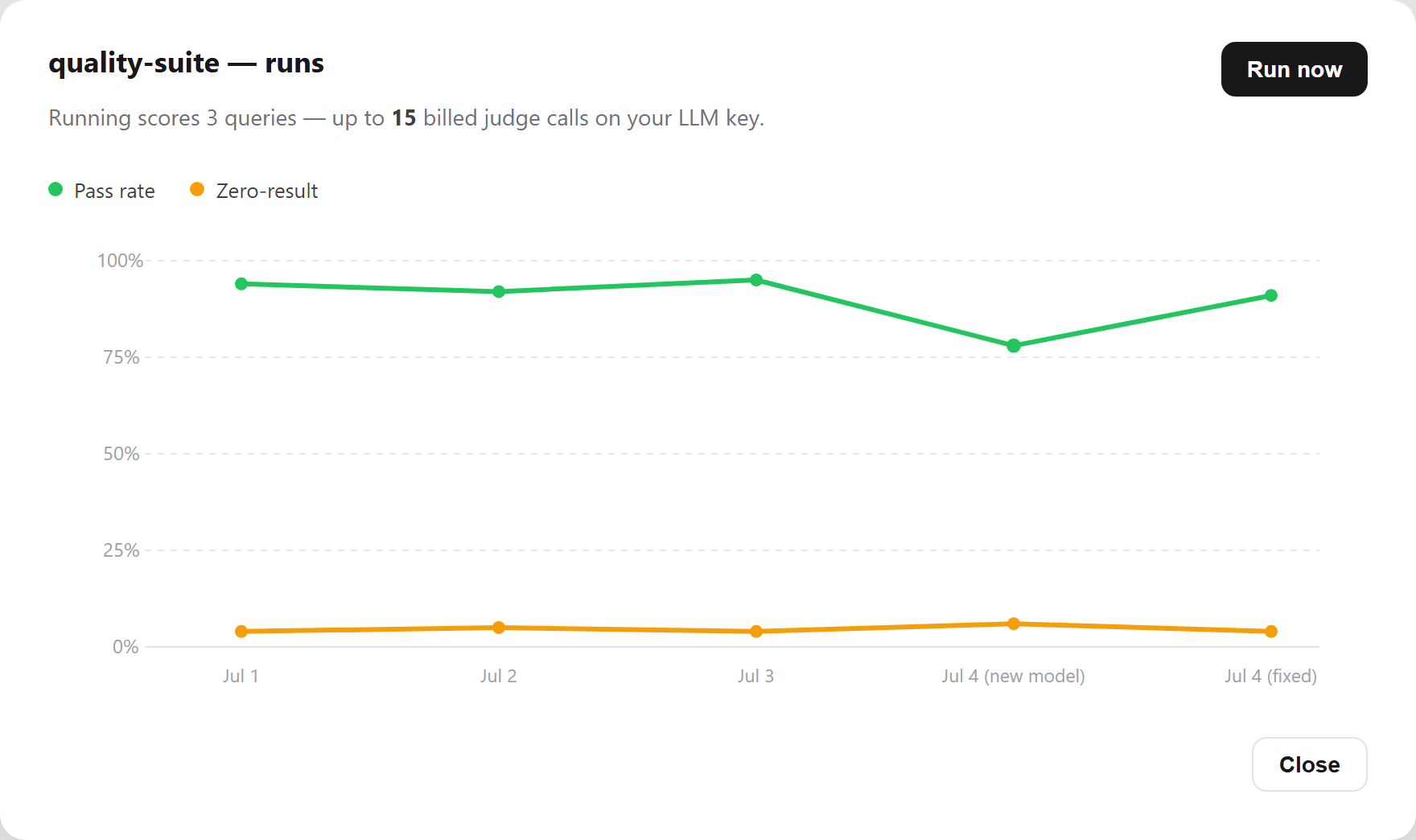
An illustrative trend: the shape a drop in quality makes when an eval catches it.
Measure every change automatically
- Turn on auto-run and the set re-runs whenever the pinned data changes: after an automatic media re-import, or once a group has finished moving to a new embedding model.
- Each auto-run bills your key; a metrics-only set makes no judge calls.
- An auto-run is skipped while the set already has a run going. Run now and the run route always start one.
- There is no built-in schedule: for a standing check, call the run route from your own scheduler.
Catch a drop
Two webhook events let a release pipeline act on a run without polling.
| Event | Sent when | Payload |
|---|---|---|
eval.run-completed | A run finishes, Completed or Failed — including a stale run saved Failed | account_name, eval_set_name, run_id, status (Completed or Failed), pass_rate (null when nothing was scored or the run failed), scored_count, errored_count, failed_queries, failure_reason (null unless Failed) |
eval.run-regressed | A completed run’s pass rate dropped by the rule below | The same without status and failure_reason, plus previous_run_id, previous_pass_rate and delta (the size of the drop) |
- The rule: a run has regressed when its pass rate is 0.05 (5 points) or more below the most recent earlier comparable run of the same set.
- A run is comparable when it Completed with a pass rate, every case was processed, and no more than a fifth of searches failed or results errored. Others are never checked and never used as the earlier run.
- The verdict is saved on the run, so run status shows it even if a webhook is lost (table below).
- Both are sent after the run is saved, best effort: they never hold up or fail the run.
| Run status field | Meaning |
|---|---|
comparable | Whether the run can be compared; null until it completes |
baseline_run_id, baseline_pass_rate | The earlier comparable run it was checked against; null without one |
pass_rate_delta | pass_rate minus baseline_pass_rate, as a fraction (−0.05 is a 5-point drop); negative for a drop |
regressed | True when the drop met the rule; null when no check was made |
Alert in your own monitoring
Finished runs send metrics to your telemetry destinations that have the metrics signal ticked.
| Metric | What it is |
|---|---|
searchstack.eval.run.pass_rate | Pass rate (0–1) of a completed run, as a histogram |
searchstack.eval.run.zero_result_rate | Share of the run’s searched queries that found nothing (failed searches left out) |
searchstack.eval.runs | Finished runs, tagged status = completed or failed |
searchstack.eval.regressions | Counted on the same rule as eval.run-regressed |
- Every eval metric is tagged
account,eval_set,model,reranker,judge,triggerandmembership_drifted. The two rate histograms also carrystatus="completed". trigger(and a run’strigger_source) isManual(console),Api(API or MCP),MediaReimportorModelConverged.- The searches a run makes are counted in
searchstack.search.*withorigin="eval"; the searches a judge makes carryorigin="judge".
Sets you made before cases existed
- Sets created before cases held a plain list of searches and one set of criteria. They read those queries back as cases named
case-1,case-2and so on, each with no criteria of its own, so each uses the set’s. Runs score as they always did. - The first edit, add or delete of a case writes the whole list out as real cases before applying the change. Left alone, it keeps working.
API and MCP
Cases have their own routes, under the set they belong to:
| Route | Notes | |
|---|---|---|
| Sets | eval/{account-name} | List, view, create, delete |
| Cases | eval-case/{account-name}/{eval-set-name} | List and create |
| One case | eval-case/{account-name}/{eval-set-name}/{case-name} | View, edit, delete (deleting twice is safe; the second call does nothing extra) |
| Bootstrap | eval/{account-name}/bootstrap | Builds a set from earlier judge runs |
| Run | eval/{account-name}/{eval-set-name}/run | Starts a run; returns a run id and an estimate of how many billed calls it will make |
| Run status | eval/{account-name}/{eval-set-name}/run/{run-id} | One run: status, counts, failure_reason, the comparison fields above, and a row per case |
| History | eval/{account-name}/{eval-set-name}/runs | Score history, newest first, 50 runs per page |
- Create a set with
judge = {"credential_name": …, "model": …, "criteria": …}— a credential and an optional model — orjudge_nameto reuse an existing judge instruction, never both. - Bootstrap takes
source_run_idsof earlier retrieve-then-judge runs: each run’s search becomes a case, and the target and judge come from those runs, so they must share one of each. Runs given explicit candidates are skipped.- Identical searches become one case; cases are named
case-1,case-2… and usecontext_textas their criteria; size is capped at 25; runs with no search text (image-only) are skipped.
- Identical searches become one case; cases are named
- Deleting a set deletes its cases, runs and any judge instructions it created for itself. A run still in progress loses its per-query rows, judge runs and verdicts at once; finished runs’ go shortly after, in the background. Deleting the pinned list or group, or the account, deletes its sets.
- On a case, leave out
criteriato use the set’scontext_text. - Editing a case keeps every field you leave out. Send an empty
criteria,filter,text_fieldsorimage_fieldsto clear it. - A case or set create or edit refused over one field is titled with that field —
size,query,context_text. - Permissions:
eval:viewreads;eval:createcreates sets, bootstraps, and adds or edits cases;eval:runruns;eval:deletedeletes sets and cases. See API keys. - Agents get every operation through MCP:
- Read:
eval_set_list,eval_set_view,eval_case_list,eval_case_view,eval_run_status,eval_run_history. - Write:
eval_set_create,eval_set_bootstrap,eval_set_delete,eval_case_create,eval_case_edit,eval_case_delete,eval_run.
- Read: