
Suggestions
Suggestions are as-you-type search: the suggest endpoint returns matching records after every keystroke. Type “run” and see “running shoes” before you finish the word.
- Full search tuned for partial queries: fast, matches the start of words, forgives typos.
- Synonyms apply here too, so a box behaves the way your search does. A rule’s other words match whole only — the start of a word is matched for what the visitor is typing, not for a word we swapped in — and a record holding what they typed always ranks above one that needed the rule.
- Powers the autocomplete component.
- An API feature — the requests below are the reference.
As-you-type, after every keystroke
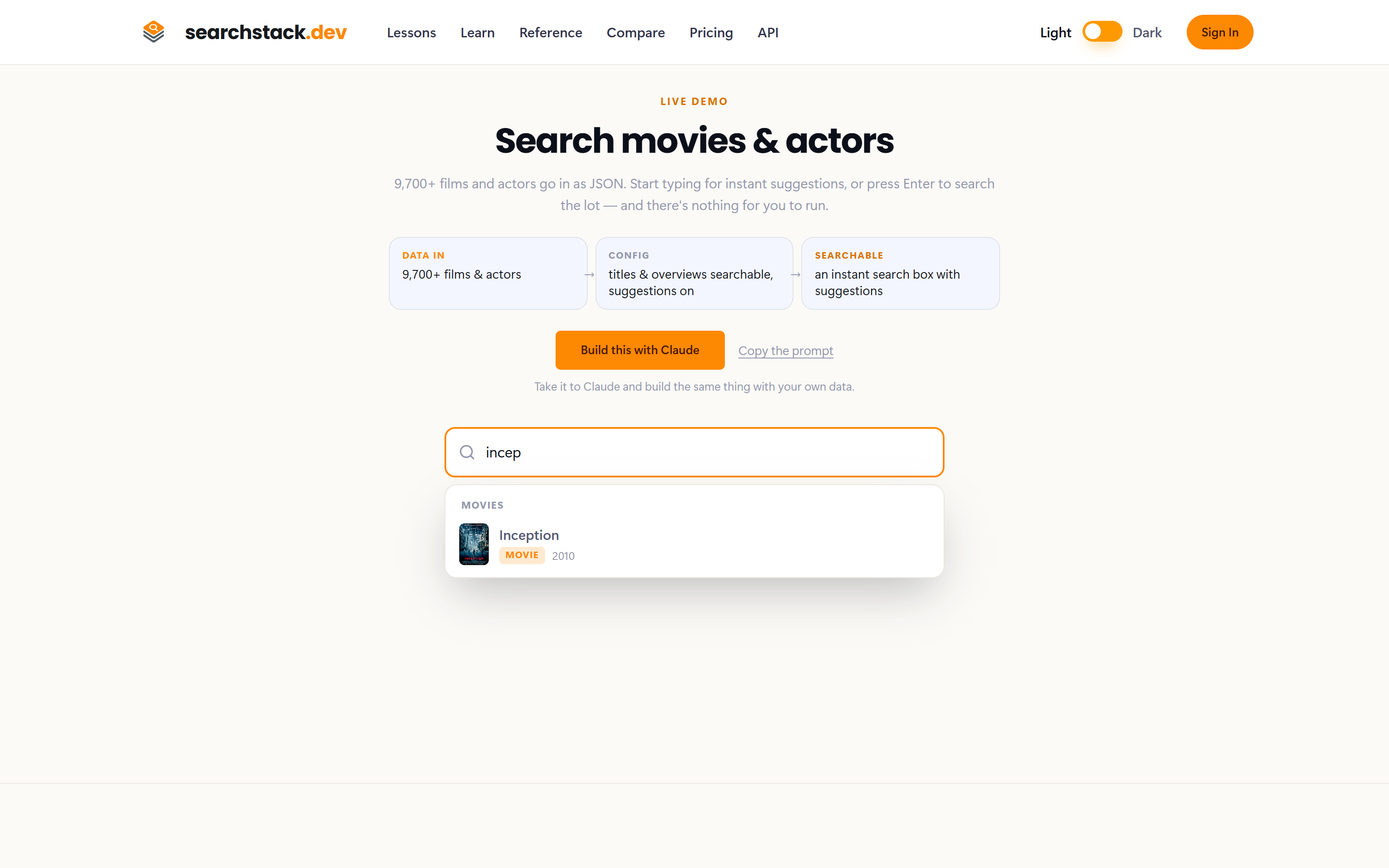
This is suggest doing its job on a live list of 9,700 films and actors: four letters typed, and the record is already on screen. Suggestions match the start of words and forgive typos, which is what makes them usable before anybody has finished typing one. Try it yourself on the movies demo.
The request
The query text goes in the path (not the query string), after the list and version — so a visitor who has typed “incep” triggers:
GET https://api.searchstack.dev/suggest/acme/movies/3/incep/suggest/group/{account}/{group}/{version}/{query}runs over every list in a group at once, exactly as full search does.- A record held by two of the group's lists is suggested once — the same rule, and the same conditions, as group search. Because of it a group can return slightly fewer than
sizesuggestions. - Both forms have a
POSTform taking the same settings as a JSON body.
| Option | What it does |
|---|---|
size | How many suggestions to return. Keep it small for a dropdown — 5–8 is typical. |
filter | A facet filter, written exactly as for full search. |
radius | Only records within a distance of a point (latitude,longitude,distance). Ranks as near does from its centre: match quality, then distance, then the shorter name. With no query, nearest first. |
cache | Set false to skip the cache when you need the very latest records. |
select | Which of your fields to return, comma-separated. Omit for all. A suggestion row is flat, so only your own fields narrow — id, name and the scores always come back. Worth setting here more than anywhere: a suggestion box renders one line per row, and a wide list otherwise sends every field of every suggestion on every keystroke. |
tie_break | A Number field that orders equally good matches, largest first — tie_break=address_count puts BONDI JUNCTION (10,780 addresses) above BON BON (2). Never lifts a weaker match over a stronger one. Set per request. On a group, every list needs the field. |
near | A point (latitude,longitude) that equally good matches are ranked nearest to. Excludes nothing: typed in Perth, george st puts Perth’s George Streets first and george st sydney still finds Sydney. The point is rounded to about 110 m. Search Stack engine only. |
match | prefix for a strict typeahead: every word must start a word, no typos, no loose fill-up. Names starting with the whole term first, then tie_break, then shorter names. Synonym rules still apply: ramsay rd finds RAMSAY ROAD. Query rules do not: vic is never turned into a state filter. Search Stack engine only. |
fields | With match=prefix: what to match — name (the default) or your own String fields, comma-separated. fields=street_name,street_type stops vic matching every street in Victoria. |
How suggestions are ranked
Each word typed is scored by how it matched a word in the record’s name, best first:
- The word being typed (the last one) matches the start of a word: “Northb” finds NORTHBRIDGE. A whole-word match ranks first only when nothing else decides.
- Earlier words are finished: a whole word beats a word that only starts with it. A space after the last word finishes it too.
- A typo ranks last: “Bon” still finds DON VALLEY, below every name with a word starting BON.
- A name that starts with what was typed moves up a level, above
nearandtie_break: “Lee va” puts LEE VAN CLEEF above VANESSA LEE CHESTER. Case and extra spaces are ignored. Off for a query a synonym rule rewrote. - Equal matches go to
nearin distance bands (1, 2, 5, 10, 25, 50, 100, 250, 500, 1,000, 2,500 km), thentie_break, then shorter names, then the nearest, then the newest record.
Response
An object with two keys, the same shape as search:
results— the ranked records (best first), each with its searchable, facet and resource fields, ready to draw in a dropdown.interpretation—nullunless a query rule rewrote the text; then it says how the query was read, so you can show it and offer the text as typed.
{
  "results": [
    { "name": "Inception", "list_name": "movies", "as_of": "2026-07-19T14:32:00Z", "year": 2010, "image_url": "https://cdn.acme.example/inception.jpg" },
    { "name": "Insidious", "list_name": "movies", "year": 2010, "image_url": "https://cdn.acme.example/insidious.jpg" }
  ],
  "interpretation": null
}
Empty results and errors
| Status | Means | Do |
|---|---|---|
200 with results: [] | Nothing matches. Never sent when the search could not run. | Show “no matches”. |
503 | The search service is busy, starting up or timed out. May carry Retry-After (seconds). | Retry after the wait; don’t show “no matches”. |
4xx | The request is wrong (bad filter, unknown list or group). | Fix the request. |
Every parameter, with its type and default, is in the API reference under Suggest.
Use the component instead of calling it yourself
The @searchstack/autocomplete component connects an ordinary <input> to this endpoint for you:
- Waits for a pause in typing before calling.
- Drops replies that arrive out of date.
- Handles the arrow keys, and draws each row with your own template.
Where the suggestions come from
- Whatever records are in the list or group you point at — often your real data, so suggesting over
productsgives product suggestions. - Or a separate list of search phrases. User Generated Suggestions fills such a list automatically from the phrases your visitors search successfully.