
Judges
A judge is a quality check for your search results: an AI model that reads each result and decides whether to keep or drop it, following instructions you write, with every call billed to your own API key.
- The model is one you already use — Anthropic’s Claude, OpenAI’s GPT, Google’s Gemini, or a model deployed to your own Microsoft Foundry resource.
- Judges run after a search, in the background, and answer in a JSON shape you define; an optional pass field turns each answer into keep or drop.
- A judge removes poor matches; it does not reorder results the way a reranker does.
- Use one for a standard relevance scores cannot check: “is this profile really a match?”, “is this product family-friendly?”, “keep only products with a price and a real description”.
What a judge does
A judge is a quality check for your search results: an AI model you already use — Claude, GPT, Gemini or a model on your Microsoft Foundry resource — reads each result and answers a question you set, such as “is this genuinely a good match?”. Judges live under Models → Judges.
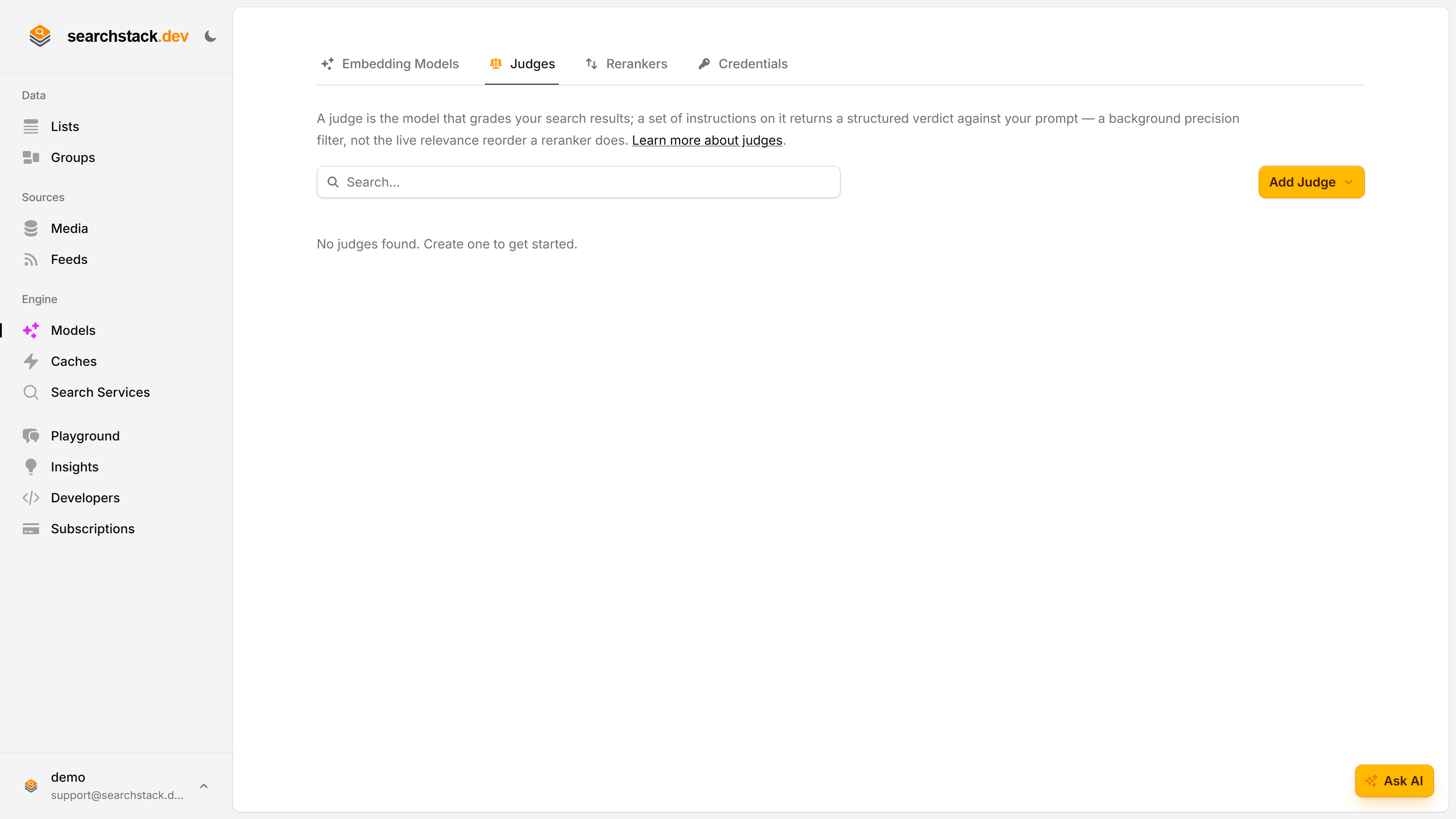
Add one, bring your own key
Click Add Judge and pick a provider — Anthropic (Claude), OpenAI (GPT), Google Gemini or Microsoft Foundry. You bring your own API key, so judge calls run on your account: your models, your limits, your bill. Keys you have already saved are offered for reuse, so you paste each one once.
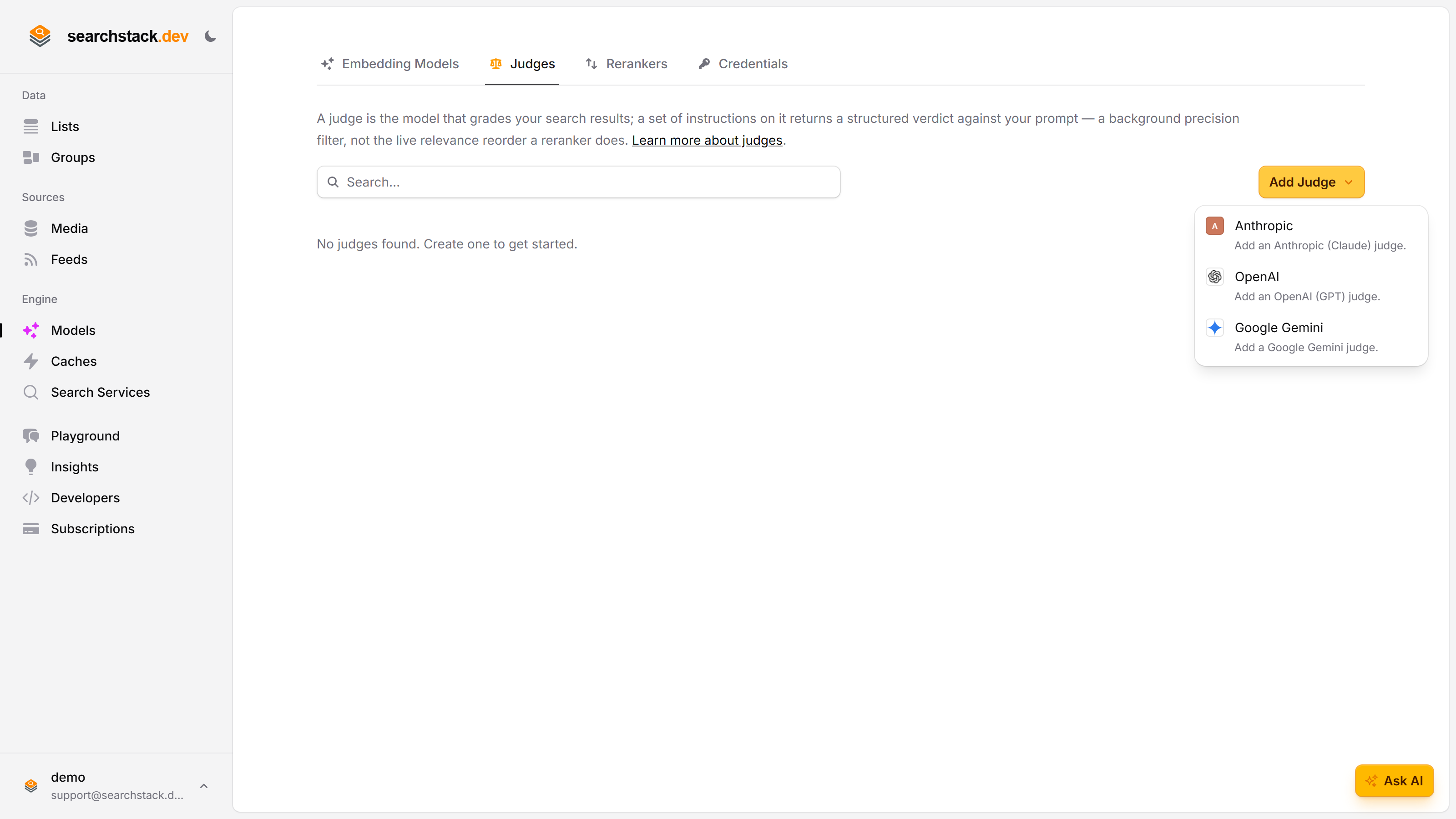
The judge is the model — the instructions say what to decide
The judge itself is just the model and the key it runs on; it decides nothing on its own. What it grades against lives in a set of instructions you add to it: the prompt, the shape of the answer, and the field that decides keep-or-drop. One judge can carry several sets, so relevance and safety share one model and one key.
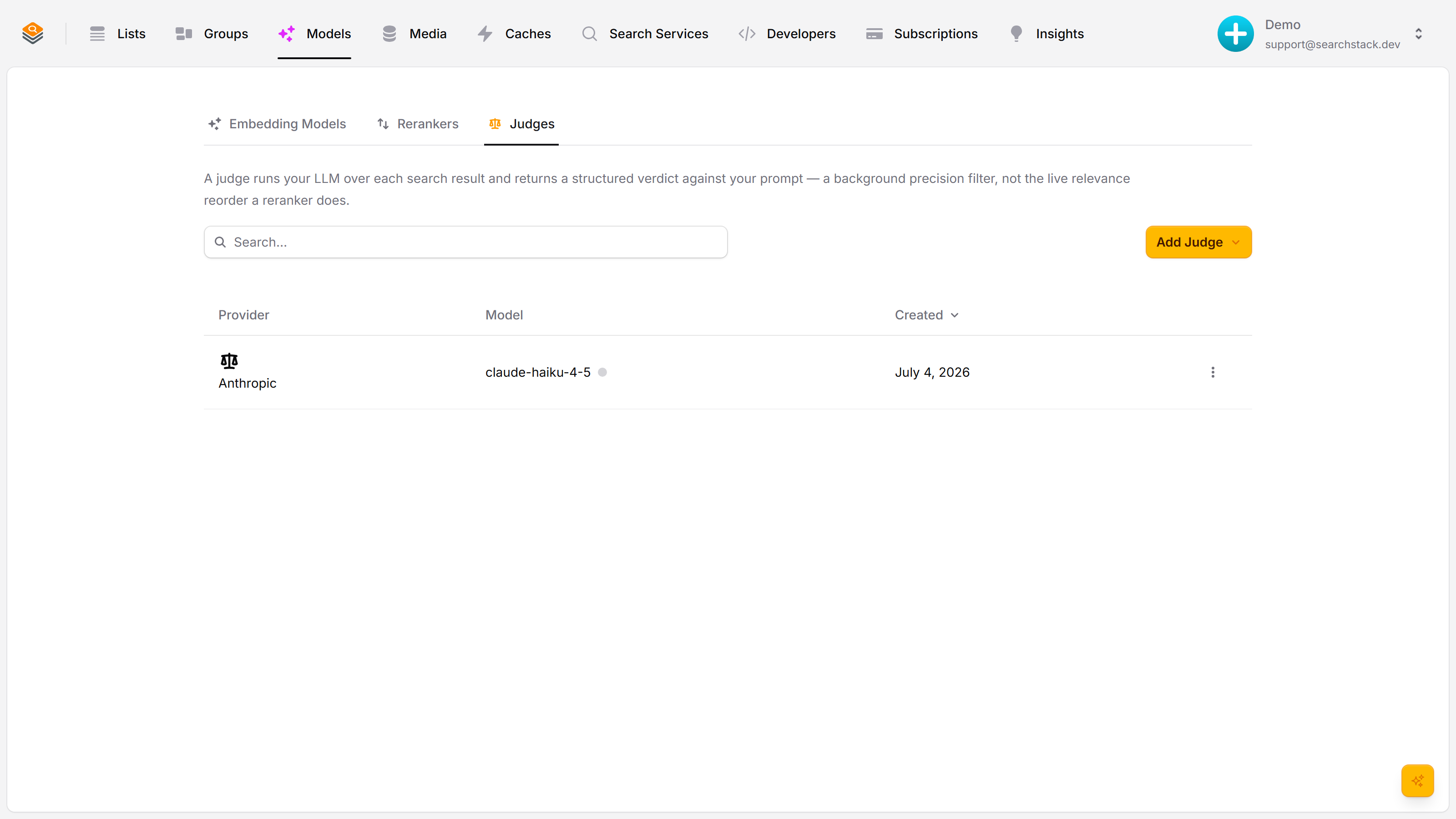
Three things define a set of instructions
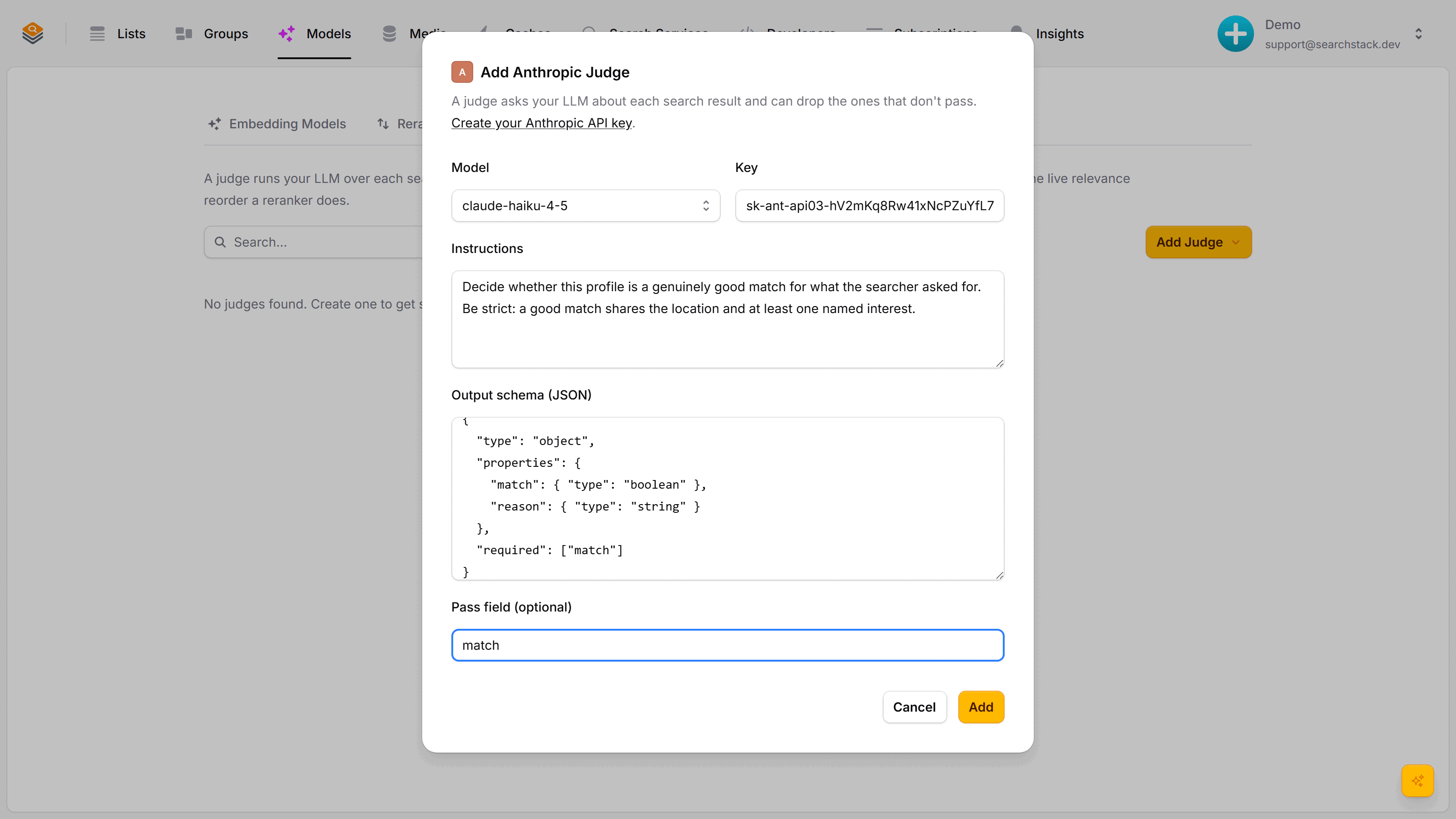
Instructions — what to decide, in plain English. An output schema — the shape of the answer you want back (here a true/false match plus a reason). And a pass field — the true/false answer that decides whether a result is kept or dropped. Stuck on the schema? Suggest has the judge’s own model draft one from what you just wrote.
Try it in a safe playground
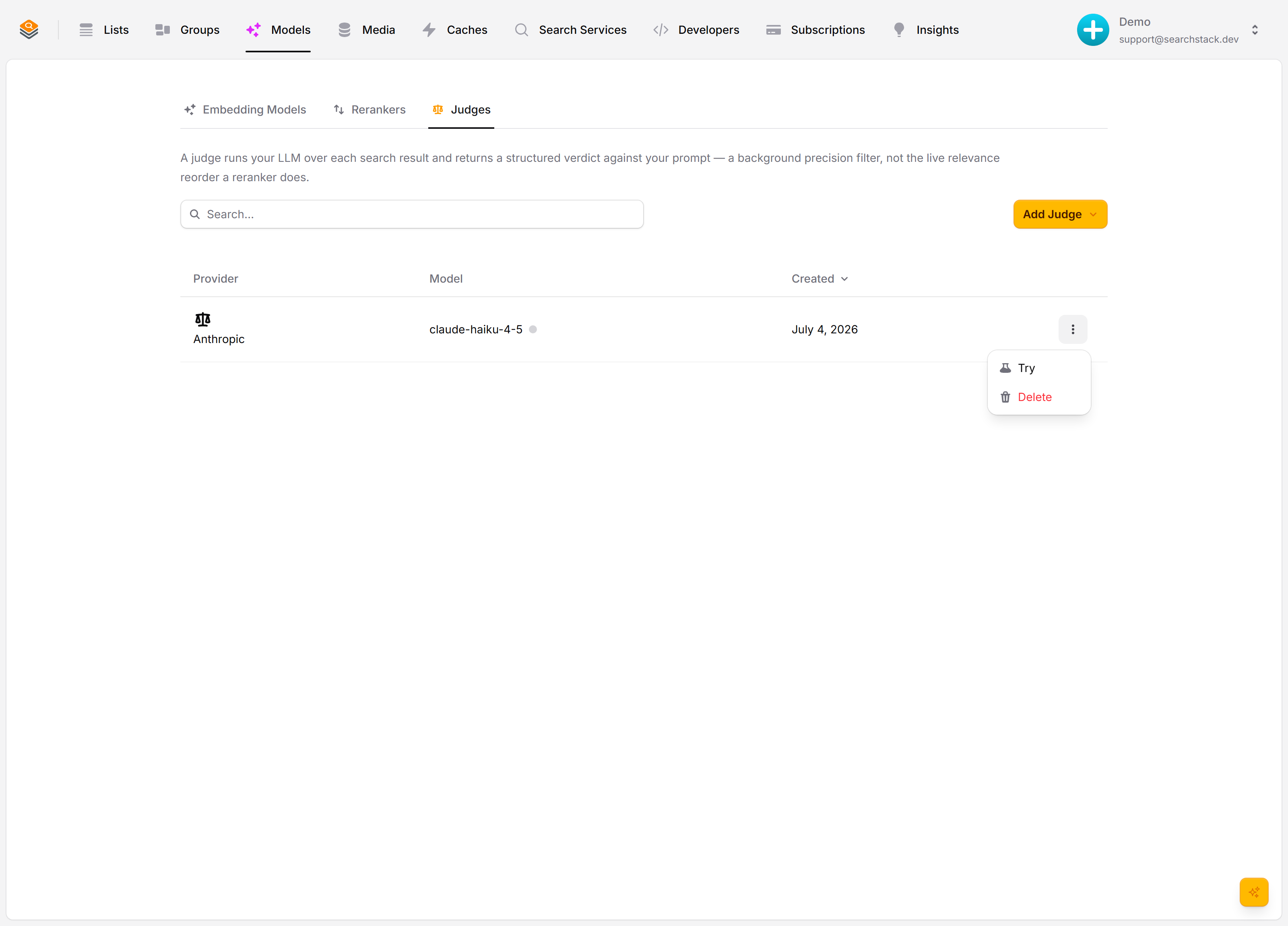
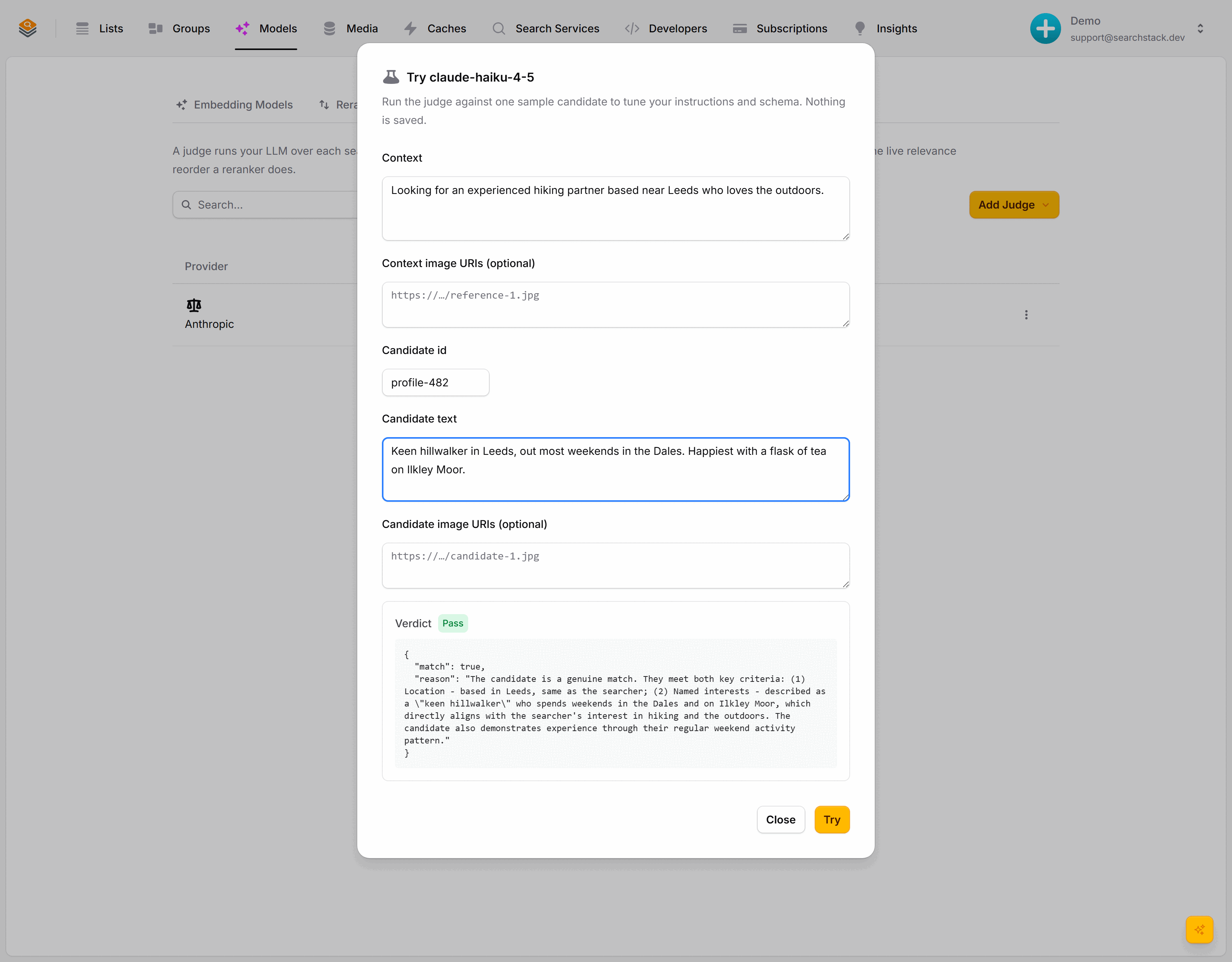
Every set of instructions has a Try action in its ⋮ menu — a safe playground: run it against one sample result and tune the wording until the verdicts feel right. Nothing is saved. History sits in the same menu: every edit keeps the previous version, and you can restore any of them.
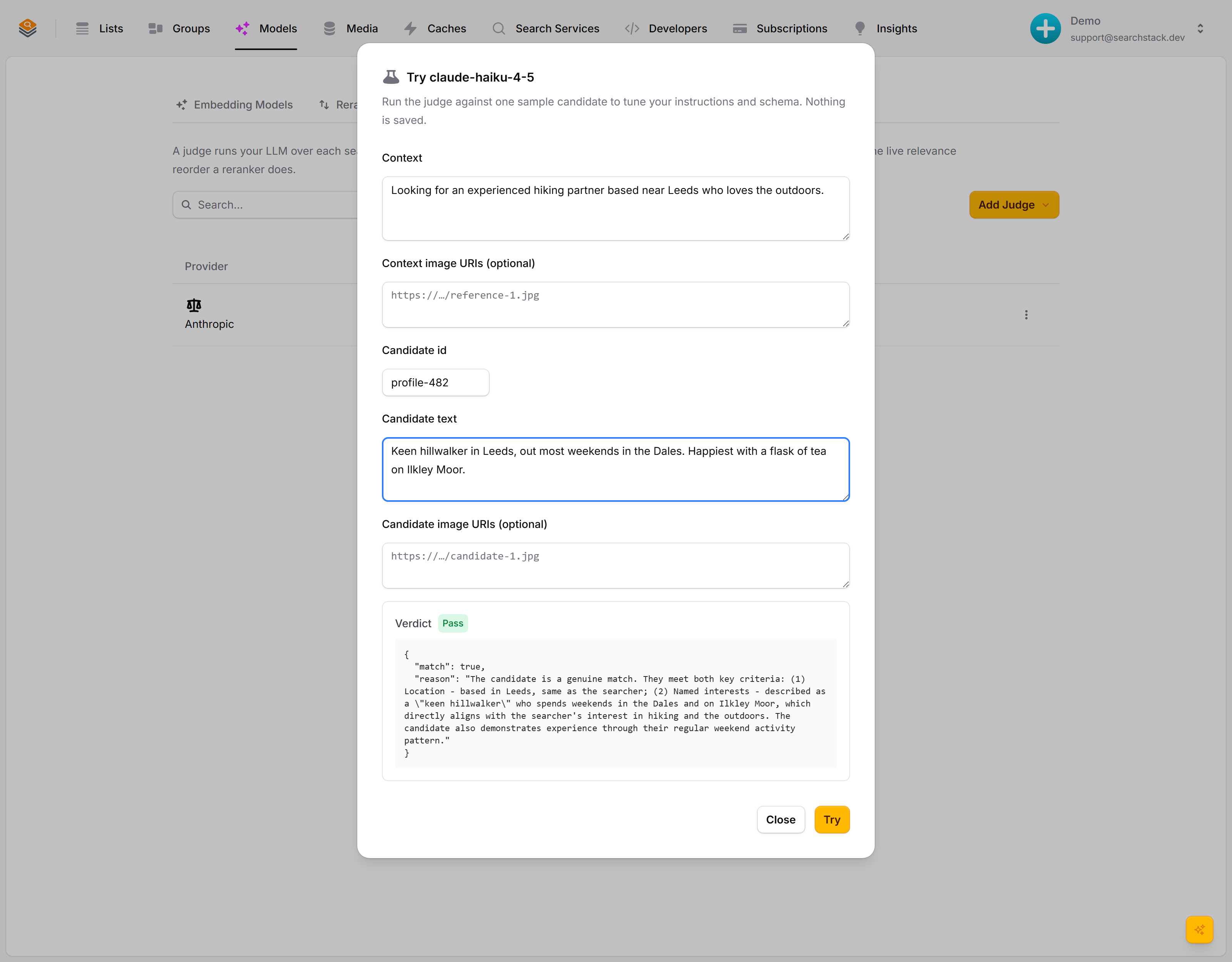
A result that passes
Give it a context — what the searcher wants — and one candidate result. The judge answers in exactly the shape you asked for: match: true, with its reasoning. The green Pass badge means the pass field came back true — this result would be kept.
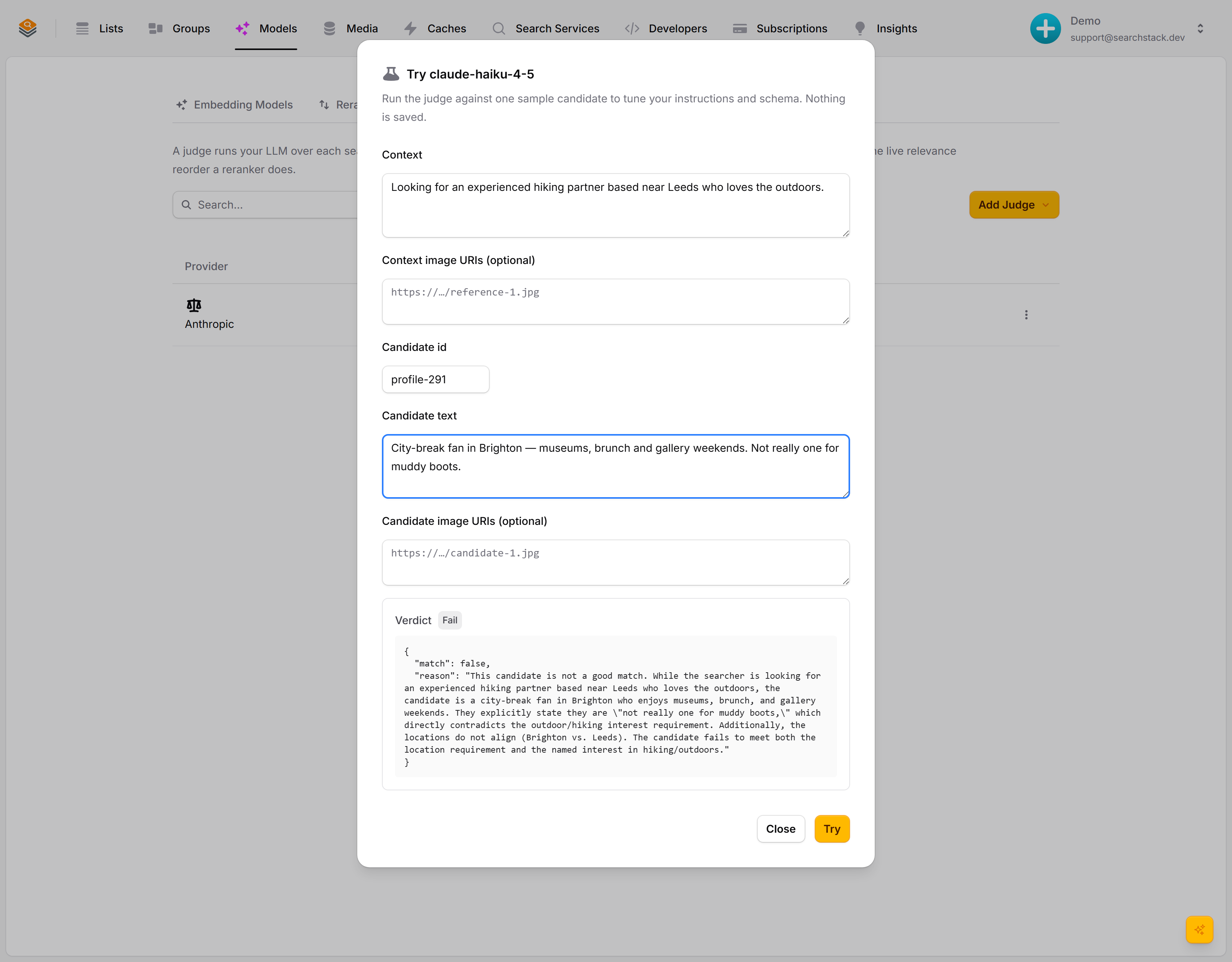
A result that’s dropped
A different candidate — wrong city, no outdoor interests. The judge returns match: false. In everyday use this is the result a judge drops — only results that clear your quality bar reach your users.
Auto-plays · use Back / Next to step through at your own pace.
The two halves: a judge and its instructions
| What it is | What it holds | |
|---|---|---|
| Judge | The model that judges: the one that answers | Provider, model, and the API key (credential) it runs on |
| Instructions | What to decide: the question the judge answers about each result | The instructions text, the output schema (the shape the answer must come back in), and the optional pass field |
- A judge alone decides nothing. The instructions are what runs — what you try out, what a run executes, and what evals and watches name.
- One judge carries several sets of instructions:
relevance,safetyandis-it-in-stockon one model and one key, so changing the key is one edit, not three.
Create a judge
- Models → Judges → Add Judge, then a provider: Anthropic (Claude), OpenAI (GPT), Google Gemini or Microsoft Foundry. Calls run on your own key — your models, your limits, your bill.
- Name it, or leave it blank to be named after the provider and model, e.g.
anthropic-claude-haiku-4-5. Name it (fast,careful) for two judges on one model. - Pick the model that will do the reading.
- Pick a credential (a saved API key). Keys saved for that vendor come first; Enter a new key… pastes a fresh one, saved for reuse. Where custom endpoints are enabled, Advanced points a new key at a proxy or compatible service instead of the provider’s address — see Credentials.
- Microsoft Foundry only: the Resource your model is deployed to. Foundry has no default address, so it is always asked for; the field offers resources saved for your Foundry models and rerankers, and a reused Microsoft credential brings its resource, skipping the field.
- Add. The key is checked with a real call before saving, and re-checked regularly; the health dot beside the judge shows a problem first.
The judge appears as a card, with no instructions yet.
- 5 judges on the free plan, 25 on paid, unlimited on Enterprise. Over the limit, create is refused with
code1 (titlemodel).
Add instructions
On the judge’s card, click Add instructions:
- Name it —
relevance,safety, whatever the check is. Evals, watches and API calls use this name. - Write the instructions in plain English: “Pass only if the product is in stock, has a price, and the description says what it is.” The result’s text is added automatically.
- Define the output schema: a JSON Schema for the answer’s shape, such as
{"pass": true, "reason": "..."}. The judge must reply in exactly that shape, so verdicts are data you can act on, not free text. Suggest drafts one from your instructions (billed to your key), often naming the pass field; it is editable, and nothing saves until Add. - Optionally a pass field: a true/false field such as
pass. A result is then kept only when it comes backtrue; blank keeps every result for you to read the verdicts yourself.
Add as many sets as you need; each appears under its judge, with its pass field beneath the name.
- Instructions and output schema are each at most 16,000 characters.
- The pass field must be a boolean or number property at the top level of the output schema. A number passes when it is above 0.
- A reply with the pass field missing or unreadable is retried, then recorded as an error, never a fail.
- Through the API, an edit that leaves out
pass_fieldkeeps the current one; send it empty to clear it.
Tune it with Try
Open a set of instructions’ ⋮ menu and choose Try before relying on it.
- Give it a context (what the searcher wants, e.g. “a hiking partner near Leeds”) and one candidate, plus image URIs (web addresses of pictures) if the judge should look at pictures.
- The answer is immediate: a green Pass, grey Fail or amber Errored badge, and the full JSON verdict.
- Nothing is saved — keep adjusting the instructions and schema until the verdicts look right.
- Try gives up after 45 seconds and does not retry a provider error; just try again.
When a run stops
- Why: run status carries
failure_reasonwhen a run Failed, or completed with every result errored. - Stops at once: a rejected key, a model the key cannot use, or an endpoint that does not exist or is not allowed. Fix the judge and start a new run.
- Stops early: if the endpoint gives no response at all for 3 results before it has answered once, or answers 3 in a row that do not match the output schema before one does, the run stops rather than retrying every result.
- Judge unreadable: a deleted judge fails the run. One that cannot be loaded for another reason is retried, then fails:
could not be loaded. Check its credential and start a new run. - Rate limited: a 429, 503 or 529 that outlasts the judge’s own retries leaves that result for the next delivery, which judges it again; only on the last delivery is it recorded as an error.
- Carries on: any other error on one result is retried, then recorded as an error for that result. In an eval, errored results are left out of the pass rate.
- Stopped responding: a run still Queued or Running after 6 hours (34 with a provider batch) reads as Failed:
The judge run stopped responding. Start a new run. - Not queued: a run we could not queue fails at once, on the run call and in run status:
The judge run could not be queued. Try again.
History: every edit is a version
- Instructions are versioned: each edit saves a new version and keeps the previous one read-only, so the wording a run was judged against is never lost.
- ⋮ → History lists every version newest-first; expand one to read its instructions, schema and pass field.
- Restore copies that version’s content forward as a new current version — it never rewinds the history.
- While an eval set grades with the instructions, the console won’t restore a version with no pass field: the set’s runs would fail.
Editing and deleting
- Edit judge (the card’s ⋮ menu) changes the saved credential the judge uses; the endpoint comes from that credential and is shown read-only. The console keeps provider and model fixed; through the API or MCP (
judge_edit), sendproviderandmodelto change them. Leave both out to keep the stored ones. - Leave
endpointout to keep it; send an empty string to clear it and use the provider’s default host. Microsoft Foundry always needs one, so an empty string keeps its current endpoint. - Through the API or MCP, leaving out
api_keyandcredential_namekeeps the judge’s current key, but only for the same endpoint and provider. To change either, send the key again or name acredential_name. - To swap in a new key, update it once on the Credentials tab and every judge using it follows.
- Edit on a set of instructions changes the instructions, schema or pass field, and adds a new version.
- Deleting a judge deletes the instructions on it; deleting a set of instructions leaves the judge intact.
- Eval sets and watches that use deleted instructions stop working: their next run fails with Judge ‘…’ is no longer configured. Recreating them under the same name does not reconnect them. Deleting a judge also removes the instructions eval sets created on it.
Where judges get used
- Watches: a watch can name a set of instructions and add its own “Only alert me if…” criteria (e.g. “only if it is under £100 and in my size”), so only new records that meet the standard become alerts.
- Evals: in Insights → Evaluations, an eval set picks which AI model judges it and carries its own pass criteria, re-running a fixed set of searches to turn quality into a single pass-rate number.
- Ask: answers are written with one of your judges’ model and key; name it in
judgewhen you have several.
API and MCP
| Route | Notes | |
|---|---|---|
| Judges | judge/{account-name} | List, view, create, edit, delete |
| Schema drafting | — | Console only (Suggest); not on the public API or MCP |
| Instructions | instruction/{account-name} | List (optionally ?judge_name=; ?judgeName= still accepted), view, create, edit, delete |
| Versions | instruction/{account-name}/{name}/versions | Plus restore/{version} |
| Run | instruction/{account-name}/{name}/run | Runs in the background over many results; returns a run id. batch: true uses the provider’s batch API (Anthropic, OpenAI): half price, usually within an hour, up to 24 h. Other providers judge one result at a time |
| Try | instruction/{account-name}/{name}/try | Answers straight away, one candidate, nothing saved |
| Run status | judge/{account-name}/run/{run-id} | Check on a run |
- A run takes
contextand exactly one ofcandidates(up to 1,000, each one billed call) orsearch(a list or group,query,size,filter). The second form is retrieve-then-judge: the run searches, then judges the hits. Only those runs can seed an eval set’s Bootstrap. - A
batch: truerun’s batch and files at your provider, which hold record text and verdicts, are deleted when the run ends — completed, failed, cancelled or deleted. Best effort. A cancelled batch’s files go once the provider ends it, which can take up to about 2 hours; after that they are left to the provider’s own expiry. - Create a judge with
api_key, or withcredential_nameto reuse a saved key:api_keyis then optional, and the credential’s endpoint is used — a sentendpointis ignored. - The console assistant can’t take a pasted
api_key: it creates or edits a judge with a saved credential (credential_name). Add keys on the Account page. - Permissions:
judge:viewreads;judge:createcreates, edits, restores and runs Try;judge:runstarts a run;judge:deletedeletes. See API keys.
| Provider | provider value |
|---|---|
| Anthropic (Claude) | anthropic |
| OpenAI (GPT) | openai |
| Google Gemini | gemini |
| Microsoft Foundry | microsoft — needs your resource’s endpoint, or a Microsoft credential that has one |
AI agents get every operation through MCP:
- Read:
judge_list,judge_view,judge_run_status,judge_instruction_list,judge_instruction_view,judge_instruction_version_list,judge_instruction_version_view. - Write:
judge_create,judge_edit,judge_delete,judge_instruction_create,judge_instruction_edit,judge_instruction_delete,judge_instruction_restore,judge_run,judge_try.