
Watches
Save a search once — “new running shoes under £100”, or just “anything new here” — and hear only when a record matches that you have not been told about.
- Never sends the same result twice. An unchanged list sends nothing; a list that gains one record sends one alert.
- Belongs to one list and searches only that list.
- Found on a list under the bell (Watches) icon in its header.
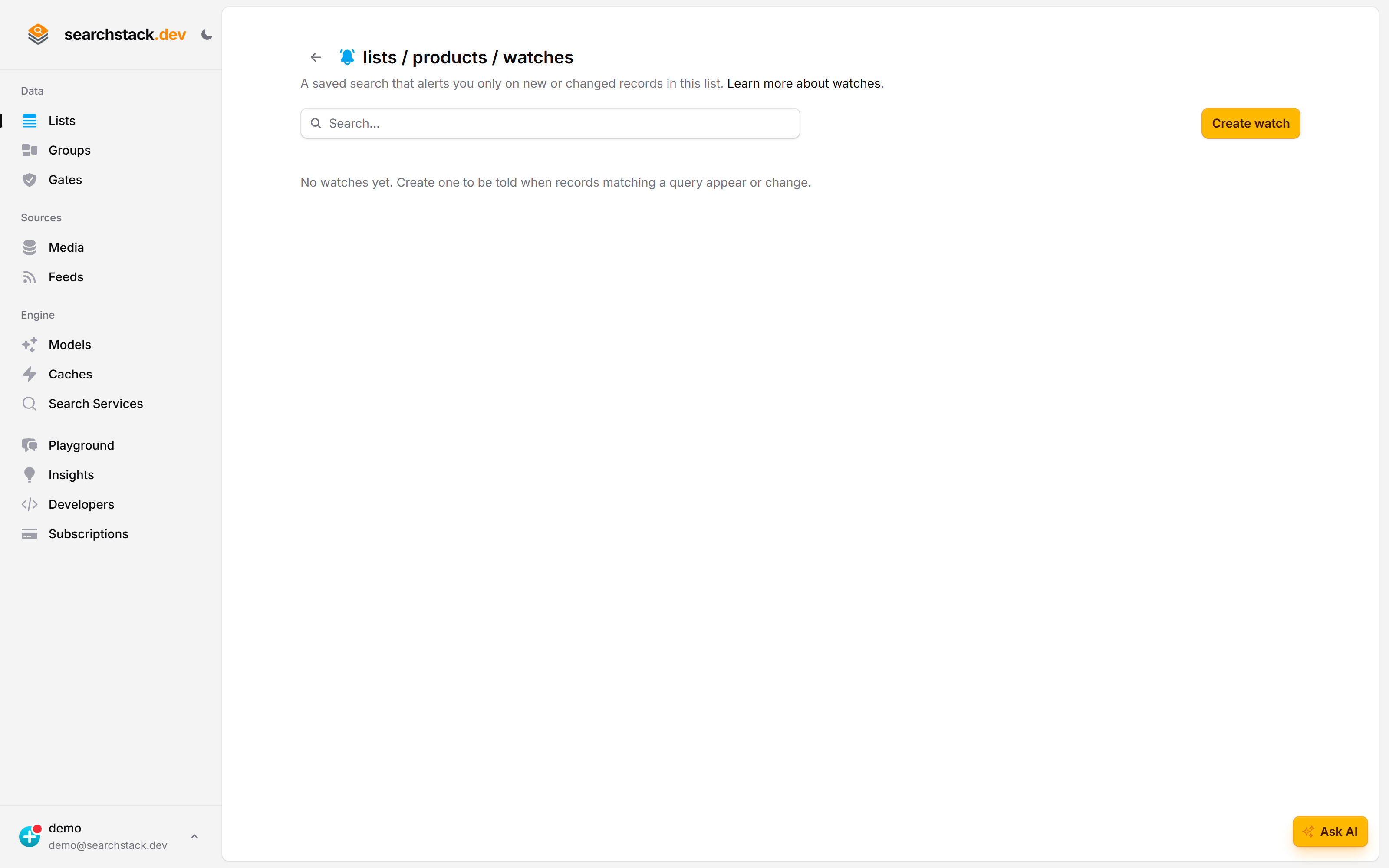
A list starts with no watches
The bell in a list’s header opens its Watches. A watch is a saved search that tells you about new or changed records. Its first check alerts on the newest records that already match, up to its alert cap.
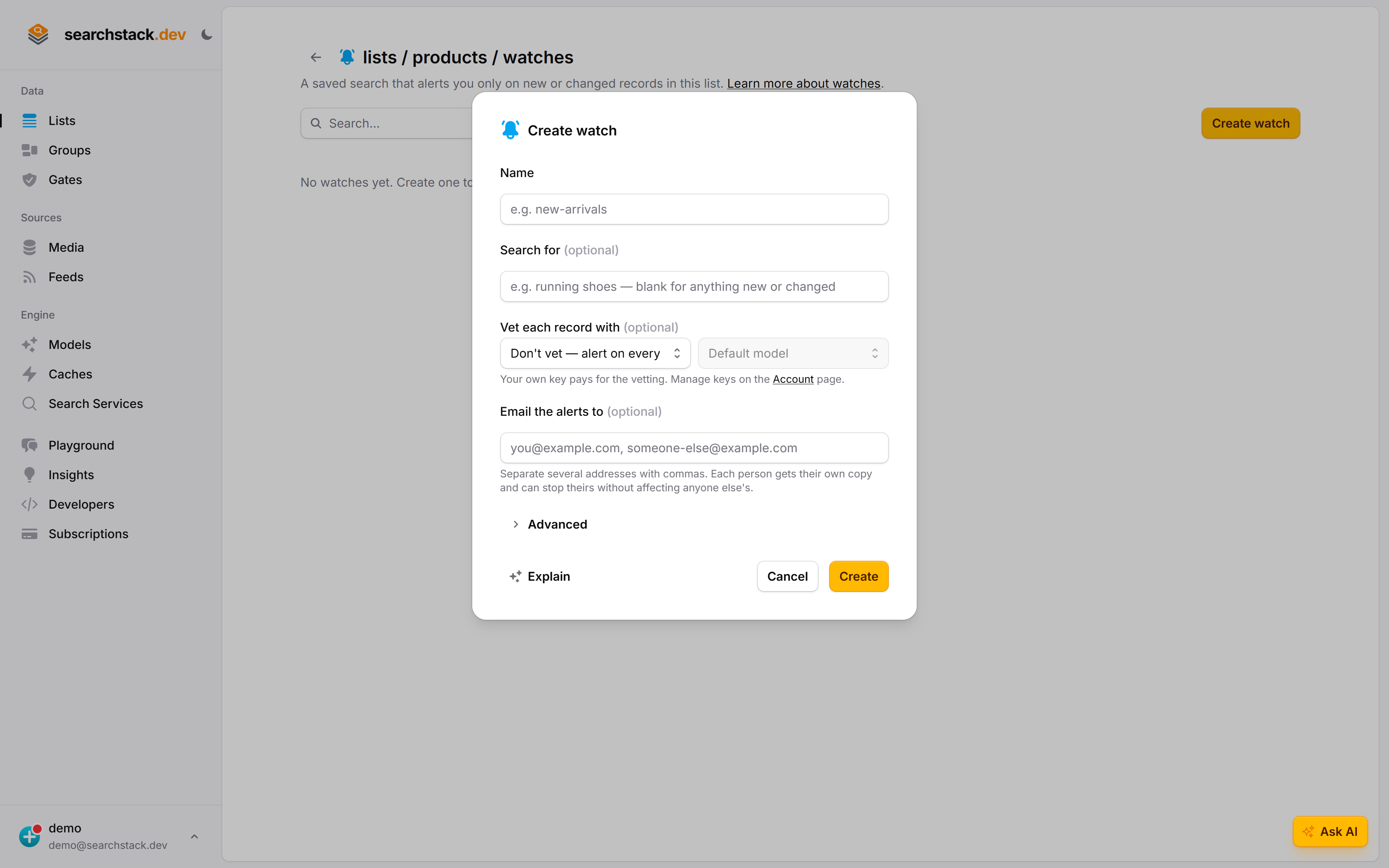
One dialog, and most of it is optional
Name it and, optionally, what to search for — blank means anything new or changed. Vet each record with has a model on your own key check each match before it alerts. Up to ten people get alerts; each can stop their own.
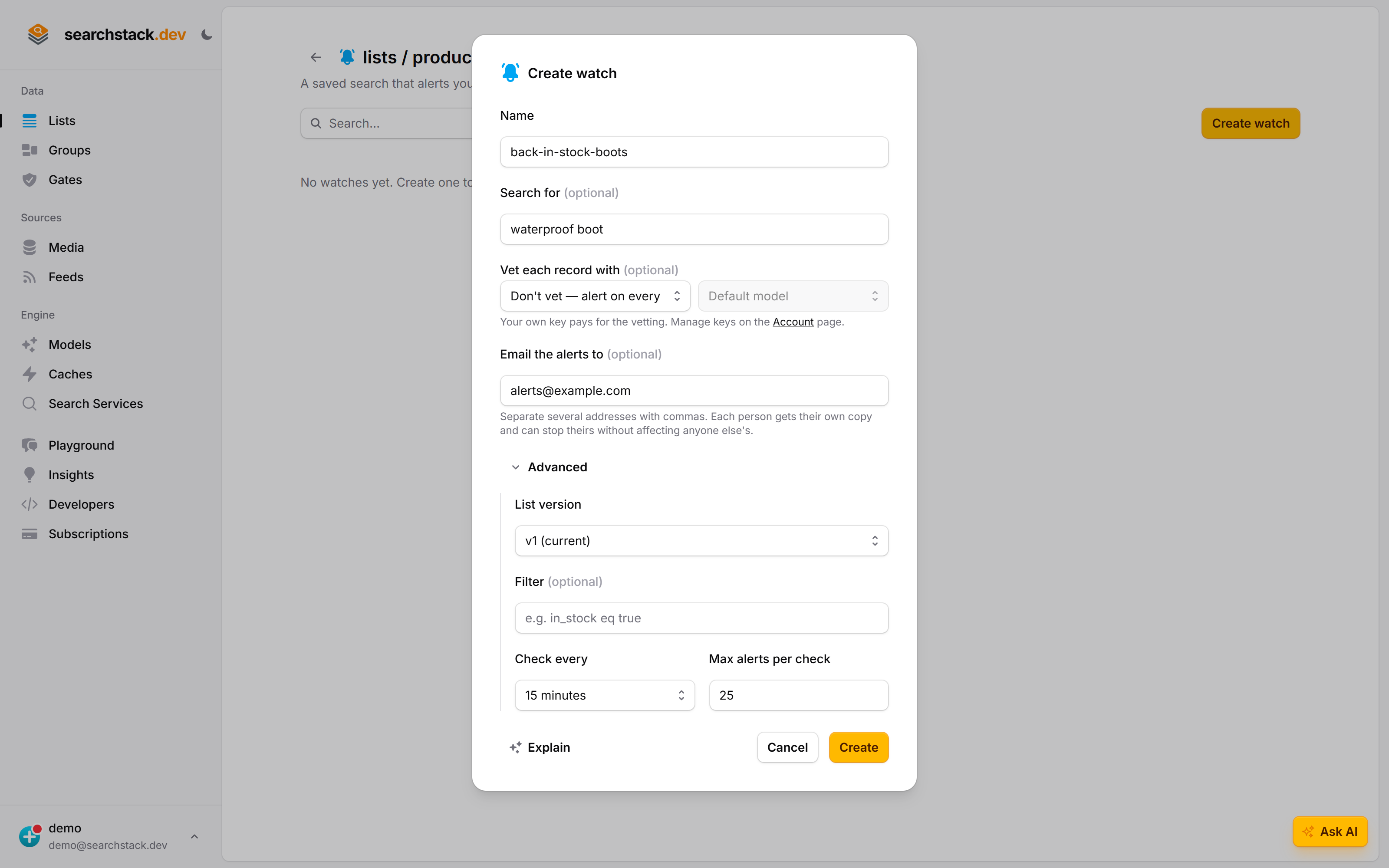
Advanced is where the noise controls live
Open Advanced to pin a list version, add a filter such as in_stock eq true, set how often it checks, and cap alerts per check. A check reads only that many of the newest matches, so a bulk import alerts on its newest few.
New or changed
A record alerts you when it is new to the watch, and again whenever its content changes — a price drop, stock coming or going, a rewritten description.
- Content means the record’s name and fields.
- Not the time it was last saved — re-importing the same data sends no alerts. Exception: on a list bigger than the watch’s memory (at least 500 records), a re-import makes forgotten records newest again, and they alert again.
- Not the relevance score, which moves with the search rather than the record.
Why a watch pins a version
A watch pins one version of its list, as an eval set does.
- A version fixes the list’s fields — the facets and searchable fields your search and filter name — so a later rename or drop cannot change what your filter means.
- Records are never versioned. A new record shows up in every version the moment it lands, so a watch on an older version still sees everything new.
Create a watch
Press Create watch on the list’s Watches page. Only a name is required; the list version, filter, check every and max alerts per check sit under Advanced, already defaulted. The watch starts on the next check run.
| Field | What it does |
|---|---|
| List version | The version to pin. Defaults to current. |
| Search for | The search words, run against the list on every check. Blank = everything in the list, which is what you want on a list filled by a feed. |
| Filter | The same filter syntax as searching, e.g. in_stock eq true. |
| Check every | 15 minutes to 24 hours. The checker runs every 15 minutes, so nothing quicker is offered. |
| Max alerts per check | 1–100 (default 25). Each check looks at only the newest this-many matching records, by last-modified time — which caps alerts and judge spend. More changes than this between checks: the older ones are never alerted. |
| Vet each record with | The saved AI provider key that pays for the checking, and which of its models does it. Choosing a key is the only switch; off is Don't vet — alert on everything new or changed. |
| Only alert me if… | What you care about. Shown, and required, once a key is chosen. |
| Email the alerts to | Who to email, comma-separated. Blank = no email. |
- No silent start. The first check alerts on records that already match — up to max alerts per check, newest first.
- Attached index refused. Creating a watch on an attached list fails with
code6. - A vetted watch is stored paused for a moment while its judge is set up, so no check runs it unvetted.
- Two creates of one name at once: one wins, the other gets
code2.
Checking alerts with a judge
Each new or changed record goes to the chosen model before it counts as an alert. A judge can decide “only if the item is under £100 and in my size”; a search cannot.
- No judge to set up first: the watch writes its own instructions, billed to that key. A watch created through the API can name instructions you wrote; the console shows them and leaves them alone.
- Only new or changed records are judged, so an unchanging list costs nothing however often it checks. A record ruled out is remembered as ruled out and is not judged — or billed — again.
- No decision on a record (a refusal, a badly shaped answer, a bad minute) — the record is still sent, marked needs review, unless the whole check fails (below).
- 4 minutes to judge per check. Records ruled on in time count; the rest are judged at the next check, not marked needs review.
- Judge cannot rule at all (rejected key, a model that key may not use, the judge deleted or replaced) — the check fails and nothing is marked as seen, so those records alert properly once you fix it.
- Provider unreachable or busy (timeout, 429, 5xx) before any record is judged — the check fails the same way, as an outage that retries on the next tick.
- Judge answers but rules on none (3 records refused or badly shaped before any is judged) — the check fails with the judge’s error and waits the interval.
- A blip loading the judge is also retried on the next tick.
- Providers grant models per project and plan, so a documented model is not always one your key can call. The judge’s health indicator reads your key’s own model list and turns red on a model it cannot use. Fix it with another model, or a key with access.
Getting alerts
Every alert is recorded in the watch’s Alerts feed (its … menu → Alerts), newest first, whether or not anything is emailed.
- Each is stamped with the version of the list searched and the revision of the watch that found it, so an old alert still says which records were included and which question was asked.
- Outside the console: email for a person, webhooks for a machine — independent of each other.
By email
- At most one email per check interval. Matches found in between (by Check now or an instant check) join the next email. Nothing found, nothing sent.
- The email names up to 10 records plus the total count; every alert is in the Alerts feed.
- Everyone listed gets their own copy, so each can unsubscribe alone and nobody sees another’s address.
- If the email to one address fails while others go out, that address misses that email and it is not resent; the alerts stay in the Alerts feed.
- Up to ten addresses per watch. Need more? A group address counts as one.
- An address containing
;is refused as not looking like an email address. - Every email carries a stop emailing me link, personal to its recipient (plus one-click unsubscribe headers). It stops mail to only that address, on every watch in the account; the watches and their webhooks keep running.
- An address that unsubscribed stays listed on the account’s other watches but gets no mail there. It can’t be added back to the account’s watches.
By webhook
Send alerts to a webhook by subscribing to either event, or both:
| Event | Sent | Payload |
|---|---|---|
watch.matched | Once per alerted record | account_name, watch_name, record_id, record_name, list_name, version, watch_revision, status (matched or needs-review), verdict (the judge’s answer, or why it couldn’t decide; null with no judge) |
watch.digest | Once per check that found anything | account_name, watch_name, match_count, needs_review_count, record_ids |
status: needs-review= the judge couldn’t decide; send it to a person.- The message carries the record’s id, not its fields: the record is live, so fetch it by id.
Is it telling you useful things?
Every alert has a thumbs-up and a thumbs-down, building the watch’s precision: of the alerts you rated, the share you actually wanted.
- Measured, never learned from — nothing re-ranks, re-tunes or filters on your ratings. Low precision means the watch is asking the wrong question — edit the search, or tighten what you asked the judge for.
- Rating the same record twice replaces the earlier rating: one rating per record.
- Sent to your telemetry destination as
searchstack.watch.precision, alongsidesearchstack.watch.matches,searchstack.watch.judge.filteredandsearchstack.watch.sweep.duration. Sweep duration is per account, not per watch. - The searches a watch runs are counted in
searchstack.search.*withorigin="watch".
Editing and pausing
- Edit is a full replace, not a partial update. It moves the watch to its next revision, so alerts either side of an edit can be told apart, and never re-alerts records already reported.
- Move to a newer list version by changing the pinned version in an edit. Leave the version out and the current pin is kept.
- A different list is not possible — that would lose the watch’s memory. Delete the watch and create another.
- Pause stops the checks and keeps the watch and its history. A paused watch is never checked.
- Editing the search or criteria does not re-check records already seen. A record ruled out stays ruled out until its content changes.
Checking now
A watch’s … menu → Check now runs the check immediately.
- The same check, not a preview: it really searches, judges, records alerts and sends the emails and webhooks. There is no test run — pause a watch you are still deciding about.
- Refused on a paused watch. Resume it first.
- On an attached index it never searches. Each check records
search_failed; delete the watch. - Records already alerted are not sent again; a check over an unchanged list costs one search and no judging.
- Runs in the background. The row says Checking now… and updates Last checked when the result lands, usually within seconds — or shows Failed.
- Resets the timer for the next scheduled check — a daily watch checked at noon next runs around noon tomorrow. After an outage it changes nothing — Last checked stays as it was.
When a check fails
A check that cannot run shows Failing on the watch and Failed under Last checked; its Alerts open with the reason.
- Nothing is marked as seen, so no alert is lost. The next check tries again.
- From the API:
last_outcome,last_errorandlast_error_utconwatch_viewandwatch_list. A check that runs setsokand clears the error. - All three are null before the first check, and again after an edit that changes the list version, search, filter, vector search, criteria or judge — including the watch’s judge recreated on another key. A watch on an attached index keeps
search_failedthrough such an edit. - A temporary failure — engine unavailable, the hourly search limit, or the judge’s provider unreachable or busy — shows the failure but leaves
last_swept_utcunchanged, so the next 15-minute tick retries. - Those retries stop 1 hour past the check’s due time; after that the watch waits its interval. A broken judge waits the interval at once.
- Check now or an instant check on a watch not yet due that hits a temporary failure is re-checked once, 15 minutes later; after that it waits its schedule.
- A check that never started changes nothing:
last_swept_utcandlast_outcomekeep their values. If another check was running, the next timer tick tries again; if the list or the watch’s memory could not be read, it is retried within minutes.
last_outcome | Means | Fix |
|---|---|---|
target_unavailable | The list, or its pinned version, is gone. | Edit to a version that exists, or delete the watch. |
search_failed | The search could not run: the plan’s hourly search limit is reached, the engine is down, or the list is an attached index (no search is spent). | Hourly limit: clears by itself within the hour. Engine down: clears by itself. Attached index: never clears, delete the watch. |
judge_failed | The judge could not rule on any record. | Fix the key, model or criteria. |
How fast
Watches are checked on a 15-minute timer. A watch runs when its check every interval has passed since its last check finished, so a 15-minute watch may run only every 30 minutes.
- Instant checks on lists SearchStack hosts: a write that matches the watch’s search and filter triggers a check within about a minute (never sooner than a minute after the last one).
- Instant checks use the list’s synonyms. After an engine restart they resume within about 30 minutes.
- Instant checks ignore check every. During steady ingest a watch is checked about once a minute — one search each, plus judging and a
watch.digestfor every check that finds something. - A slow engine doesn’t hold a save. Create, edit and delete wait at most 5 s to register or remove instant checks; past that, the next 15-minute sweep finishes it.
- Timer only: vector-search watches, and lists on other backends.
- Not yet on an attached index (e.g. Azure AI Search): a check orders records by last-modified time, which an attached index can’t map yet. Create is refused; an existing watch shows
search_failedwithout spending a search. - Emails stay at most one per interval; matches from instant checks join the next email.
From the API
Every watch action is on the public API and the MCP tools. Shapes in the API reference.
| Route | MCP tool | Permission | Does |
|---|---|---|---|
GET /watch/{account} | watch_list | watch:view | List watches; list_name narrows to one list. |
GET /watch/{account}/{watch} | watch_view | watch:view | The full definition. |
GET /watch/{account}/{watch}/matches | watch_match_list | watch:view | Alert history, newest first. take: default 50, max 500; 0 or less returns 50. |
POST /watch/{account} | watch_create | watch:create | Create. |
PUT /watch/{account}/{watch} | watch_edit | watch:edit | Replace the whole watch, including pause and resume. |
POST /watch/{account}/{watch}/check | watch_check_now | watch:edit | Check now. |
POST /watch/{account}/{watch}/feedback | watch_feedback | watch:feedback | Confirm or dismiss an alert. |
DELETE /watch/{account}/{watch} | watch_delete | watch:delete | Delete. |
- Pause or resume: edit replaces every field, so send back everything from
watch_viewwith onlyenabledchanged. A left-out field reverts to its default — nonotify_emailsmeans no email, no judge means no vetting. Left out,enabledandlist_versionkeep their current values. - Check every (
interval_minutes): 15 or more through the API; the console offers up to 24 hours. - Alert history is trimmed to the newest 1,000 alerts and the last 90 days, at most once a day, when the watch records a new alert. A watch that stops alerting keeps its history until you delete it.
- Refusals carry a
codein the problem body:
code | Refused because | Route |
|---|---|---|
| 1 | The plan’s watch limit is reached. | Create |
| 2 | A watch with that name exists. | Create |
| 3 | The list does not exist. | Create, edit |
| 4 | The list has no such version. | Create, edit |
| 5 | The watch is paused. | Check now |
| 6 | The list is an attached index. | Create |
Limits
| Free | Paid | Enterprise | |
|---|---|---|---|
| Watches | 5 | 25 | Unlimited |
- Name: letters, digits and single hyphens, up to 100 characters.
- Search text up to 1,000 characters, criteria up to 16,000, filter up to 16 KB and 200 conditions.
- Every check — timed, instant or Check now — uses one search from your plan’s search allowance.
- 25 watches checking every 15 minutes is about 50 timed searches an hour (each runs about every 30 minutes). During steady ingest, instant checks add up to one search a minute per watch.
Deleting
Deleting a watch removes its alert history and your ratings. Your records are untouched — a watch only ever reads. Deleting the list deletes its watches.
What a watch is not
- Not instant. An instant check can still lag a write by about a minute — see How fast.
- Not a copy of your data. It keeps each alerted record’s id, name and the judge’s verdict, never its fields.
- Not a learning system. Nothing acts on your ratings but you.