
Account Health
Account health answers one question: is anything wrong with my account right now?
- Live faults only — a feed that stopped fetching, an import that failed, a store of yours that stopped answering.
- Not whether your search is set up well — that is Recommendations.
- Worked out fresh on every page load. Nothing is stored.
One page for what is wrong right now
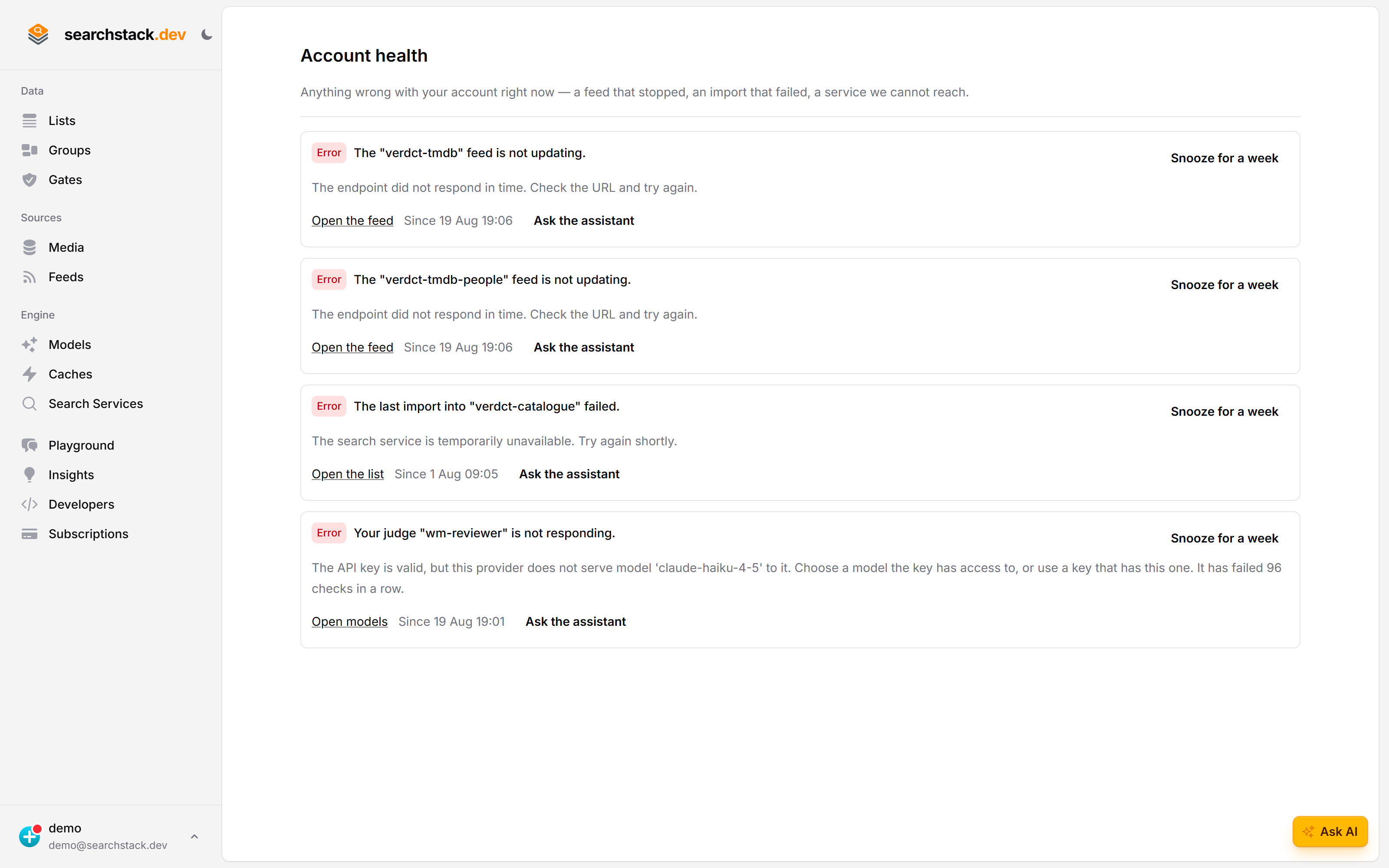
Account health in the account menu (the dot on your picture) lists only what is broken now — a feed that stopped, an import that failed, a service we cannot reach. Each row links to the fix. Nothing wrong reads Nothing needs attention.
Snooze is an answer; ignoring is not
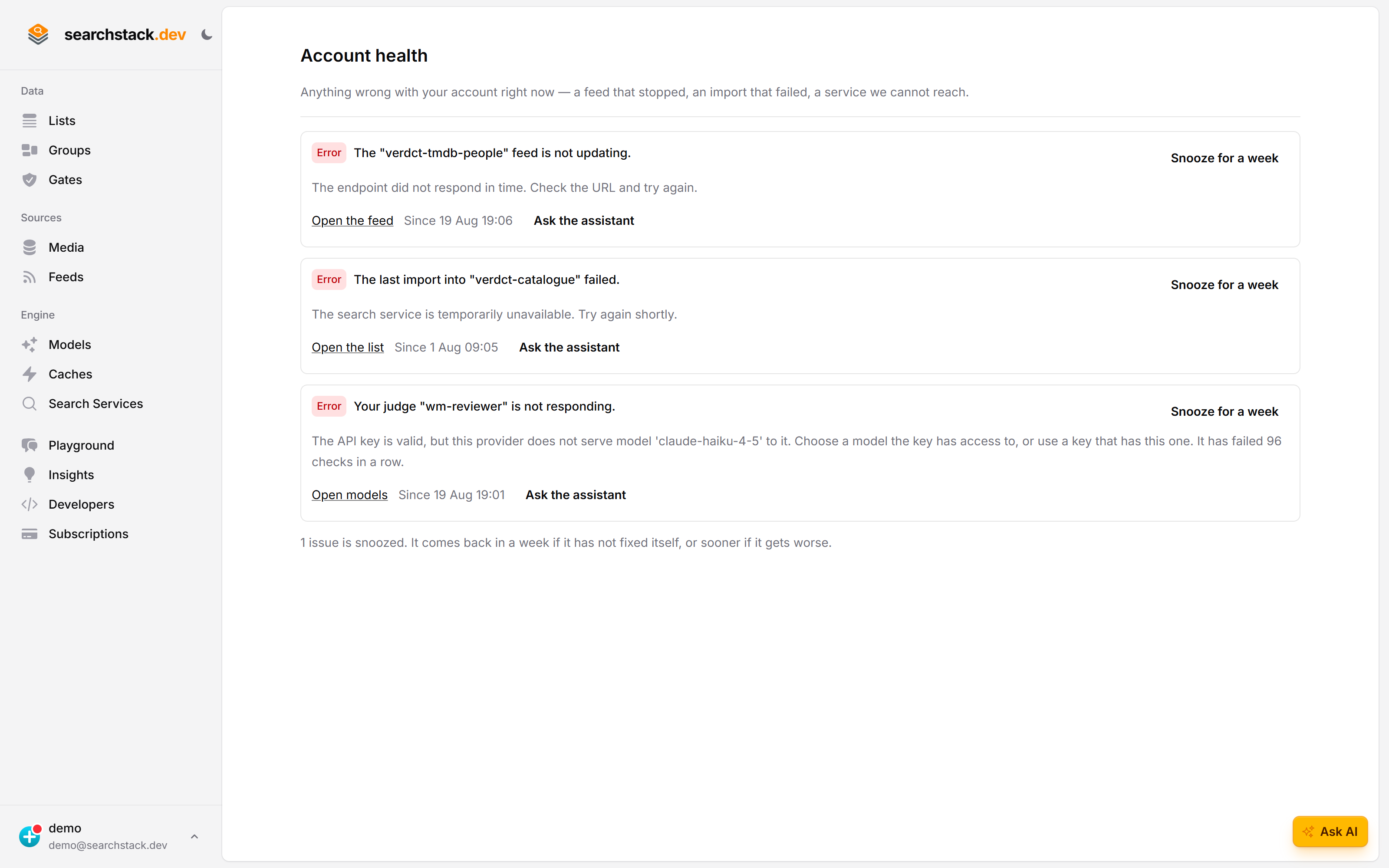
Something you already know about can be snoozed for a week, so the page keeps meaning “these need you”. It comes back if it is still wrong when the week is up: snoozing hides an alert, it never resolves one.
The dot on your account picture
- Red — your data is out of date or broken now.
- Amber — nothing is broken, but data may be behind until something resumes: paused syncing, an import stopped early.
- No dot — nothing is wrong. No green tick, no counter sitting at zero.
- The account menu always carries Account health, dot or no dot, with the number of issues.
The Account health page
- One row per issue, worst first: severity, what happened in plain words, when it started, and a link to the thing itself — Error — The “tmdb-films” feed is not updating — Since 5 Aug 2026 09:12.
- All clear reads Nothing needs attention. A check that could not run says so instead, naming it, with Check again.
- A failed or interrupted import row has Open the import: the run’s errors, and a retry where one is possible.
- Separate from Profile (name, email, country, password, account picture).
- Rows only cover things you still have — delete a list and its rows go too.
Snoozing a row
Each row carries Snooze for a week, for something you already know about.
- Back after seven days if the problem is still there.
- Back sooner if it gets worse — snoozing a warning does not silence the error it turns into.
- The panel says how many rows are snoozed, even when nothing else is wrong.
- Account-wide, not personal: it quietens the panel for your colleagues too.
- Needs permission to edit the account; reading the panel is not enough.
- Console only: an API key is refused.
- If we cannot check the problem just then, the snooze is refused (503) — try again.
- Clicking Snooze again does not renew a snooze once the issue has cleared.
- Deleting a list, feed, gate or service clears its snoozes, so a new one of the same name starts with nothing hidden.
- Resuming a switched-off service clears its snooze.
What is checked
| Check | check_id | Raises | What it means |
|---|---|---|---|
| A feed has stopped updating | feed-poll-failing |
Error | The source refused us or could not be reached; the row carries its reason. Shown from the first failed sync. Lists fed by it are quietly out of date. Not for feeds you paused. |
| A feed has gone quiet | feed-quiet |
Error | No failure was recorded — it stopped checking, or never checked. Raised once past twice its own interval. Not for email feeds or feeds you paused, and hidden while automatic syncing is paused. Not raised for two intervals after you resume the feed, or for 15 minutes after a sign-in. A sync that keeps restarting after the feed was already overdue does not hide it; while one is running, the detail says Sync now is refused until it ends. |
| An import failed | import-failed |
Error | The latest import into a list stopped on your file or store — a bad row, a file too big, a store out of reach. |
| An import was interrupted | import-failed |
Warning | The run stopped early: you pressed Stop importing, another import into the list took over, too many rows could not be used, or a restart on our side. The detail says which. A feed or linked file re-imports at its next sync; an upload must be sent again; a list you stopped waits for Resume imports. |
| A connected service is not responding | service-unhealthy |
Error | A media store, search service, cache, telemetry destination or judge failed three checks in a row, counted at most once an hour — about 12 hours on the six-hourly check. One or two failures raise nothing. A media store or search service is then switched off instead, with the exceptions listed there. |
| A gate backfill did not finish | gate-backfill-failed |
Error | A gate backfill stopped part way, so some records hold their old values. A run with no progress for 2 hours counts as failed (“The backfill stopped making progress”). Re-run it from the gate’s Gate version… on the list’s gates page (Filling gaps: gate_backfill through the API). Deleting or detaching the gate deletes its runs and snoozes. |
| Some records have no vector | vectors-incomplete |
Error | Records were saved without a vector: the embedding model’s provider refused, throttled or could not be reached until our retries ran out; its monthly budget ran out; the model or its credential could not be read; or a model change’s rebuild could not start. The row says which. Searches rank on keywords alone. Fix the cause named in the detail, then press Rebuild after fixing it. Never raised for an attached list. |
| Automatic syncing is paused | auto-sync-paused |
Warning | Your plan pauses background syncing after a stretch with no sign-in; signing in resumes it. With no active plan, syncing is off until you choose one. Only raised when the account has a polled feed (not an email feed or one you paused) or synced files. |
“Switched off” is the one to read carefully
A media store or search service that fails three checks in a row is dropped: we stop trying it and stop syncing against it. The row then says switched off rather than not responding.
- Fixing your end is not enough — we no longer check it, so nothing here notices it come back.
- Repair it, then press Resume after fixing it on the row.
- Or on Media (or Search Services) — see media stores — where the store shows Sync paused: choose Resume syncing from that row’s menu.
- If the health record can’t be reached just then, Resume is refused (503) — try again.
- The owner’s email is headed Syncing switched off. If it fails to send, later checks retry it until it is sent.
- Resume applies only to a switched-off search service or media store. Anything else clears on the next six-hourly check, or sooner: editing a cache, media store, search service, telemetry destination or a judge re-checks just that one straight away.
- A failing service stays on, recorded failing, when more than five services across SearchStack were switched off in the past hour (a later check switches it off), when the check failed on our side, or when that hourly count can’t be taken.
- Nothing has been deleted meanwhile.
- Caches, telemetry destinations and judges are never switched off, and nor is an attached search service. Its check reads documents, not just the connection.
- A search service or judge whose saved credentials can’t be read shows The saved credentials can’t be read… (a judge: The judge’s saved key or credential can’t be read…) and is never switched off. Edit it and enter them again; there is nothing to resume.
- Editing an attached search service’s query key re-tests it at once and clears its row.
- Services are checked every six hours.
“We could not check everything”
A check that cannot read what it needs says so, rather than reporting all clear. Nothing is wrong and we could not look are different answers.
Ask the assistant
- Ask the assistant on a row opens the assistant with that issue described. It reads the error, looks at the setup, and often fixes it — for example, why a source refused your feed.
- The checks are free and always run; an assistant turn costs one credit, spent only on the issue you choose.
- Nothing greets you at sign-in to say something is wrong.
When we email you
- A feed failing to fetch three times in a row emails the account owner, then again each week it keeps failing — not once per failure.
- The next successful sync resets it, so a later problem gets a fresh email.
- The owner is also emailed when an import fails, a search service or media store is paused, or a webhook is suspended.
Over the API
The same answer, for a script or a status page of your own:
GET /account/issues/{account-name}{
"issues": [
{
"check_id": "feed-poll-failing",
"severity": "error",
"title": "The \"tmdb-films\" feed is not updating.",
"detail": "The source refused the request.",
"since": "2026-08-05T09:12:00Z",
"target": { "kind": "feed", "name": "tmdb-films" }
}
],
"checks_run": 6,
"checks_total": 7,
"checks_not_run": ["import-failed"],
"dismissed": 0
}| Field | What it holds |
|---|---|
check_id | Which check raised it — one of the seven in What is checked. |
severity | error or warning. |
title | One sentence saying what is wrong. |
detail | What we know underneath it — usually the reason and what to do. |
since | When it started, or null where there is no such moment — a paused sync began at no particular instant. On feed-poll-failing: when the failures began, not the latest one. On service-unhealthy: when syncing was switched off, otherwise when the service last worked, or its latest failed check if it never has. |
target.kind | Inside each issue’s target: feed, list, account, media-store, search-service, cache-service, model or telemetry-sink. model is always a judge. |
target.name | A name, not a link, so it passes straight to another call — tmdb-films is what you give the feed API. |
subject | Only on a failed gate backfill: the gate. Two gates failing on one list are two rows, snoozed separately. |
run_id | Optional, on import-failed and gate-backfill-failed: the run to look up. In both clients. |
checks_run / checks_total | An empty issues array means a healthy account only when the two match. A lower checks_run means the answer is incomplete. |
checks_not_run | The check_ids that could not read their data. Omitted when every check ran. |
dismissed | How many real issues someone on the account snoozed, and so are missing from issues. Above zero is not a healthy account. |
An issue is identified by check_id, target.kind, target.name and subject. Snoozing is console-only and has no API. Full shape in the API reference under Account. Both clients carry it:
var health = await client.Accounts.GetHealthAsync("acme");const health = await client.Accounts.getHealth("acme");For agents
MCP: account_health — read-only, costs nothing, and the right first call when a search returns out-of-date results. It separates “the data really is old” from “the query is wrong” in one step.
Notes
- Nothing is stored, so a problem that fixes itself disappears — nothing to mark as read, no history.
- The exception is a snooze, which lapses after a week.
- Platform outages aren’t reported here. An import stopped early is shown as a warning, whatever stopped it, because the data is older than you think.
- Looks at the newest 200 imports and 50 gate backfills on the account.
- Anyone who can read the account sees the same panel, contributors included.
- Webhook deliveries are not covered yet.
- Not Recommendations in Insights: that is standing advice about your setup, this is a live fault that clears when the thing recovers. Hiding differs to match — a snooze always lapses, a recommendation can be hidden for good.