
Imports
Records reach a list by being imported — from a feed, or from a file in one of your media stores.
- Every import is written down as an import run: what it loaded, how far it got, how it ended.
- Readable while it runs and long afterwards.
- A file is imported from its own row: Import into list… on the media store page. That is the only door — upload the file to a store first, from the same page. The list itself has no import action.
- Adding data and connecting a feed are different actions. Importing a file loads it once. A feed rewrites its file every sync, so you point a list at it with Connect a feed on the list — the list then moves with the feed instead of holding a copy of one moment. Feed files are not offered as a plain import for that reason.
Every import is written down
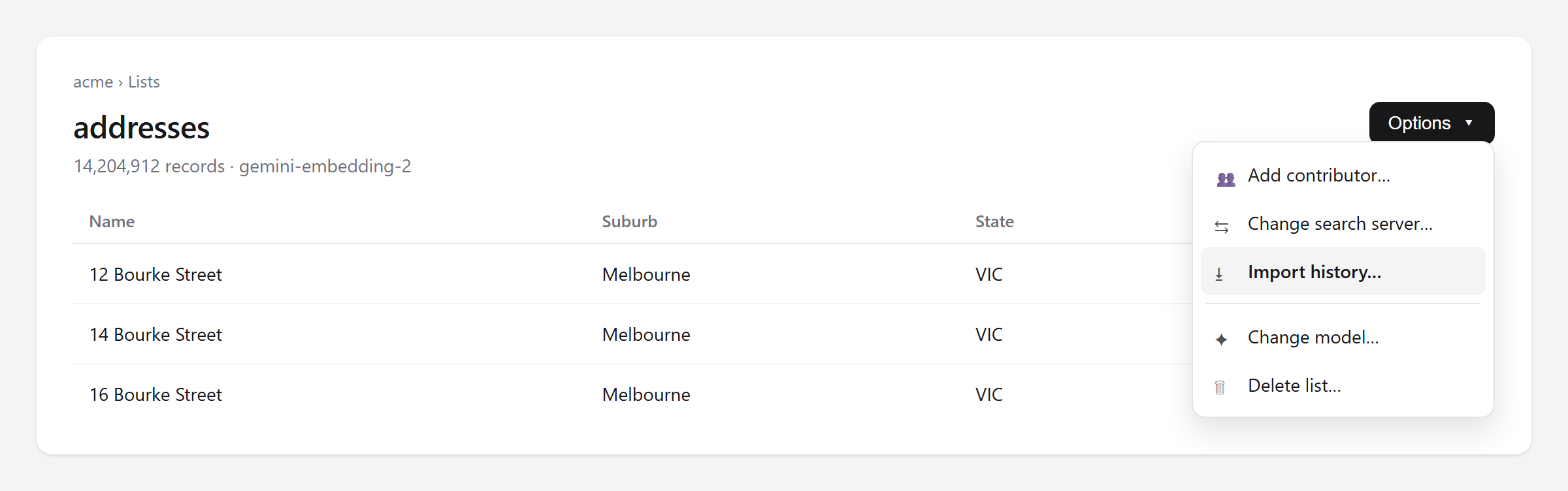
Whenever records are loaded into a list — from a feed, from a file in one of your media stores, or from something you uploaded — the platform keeps a record of that import run: what it was loading, how far it got, and how it ended. Open a list and choose Import history from the Options menu.
Watch a large import as it runs
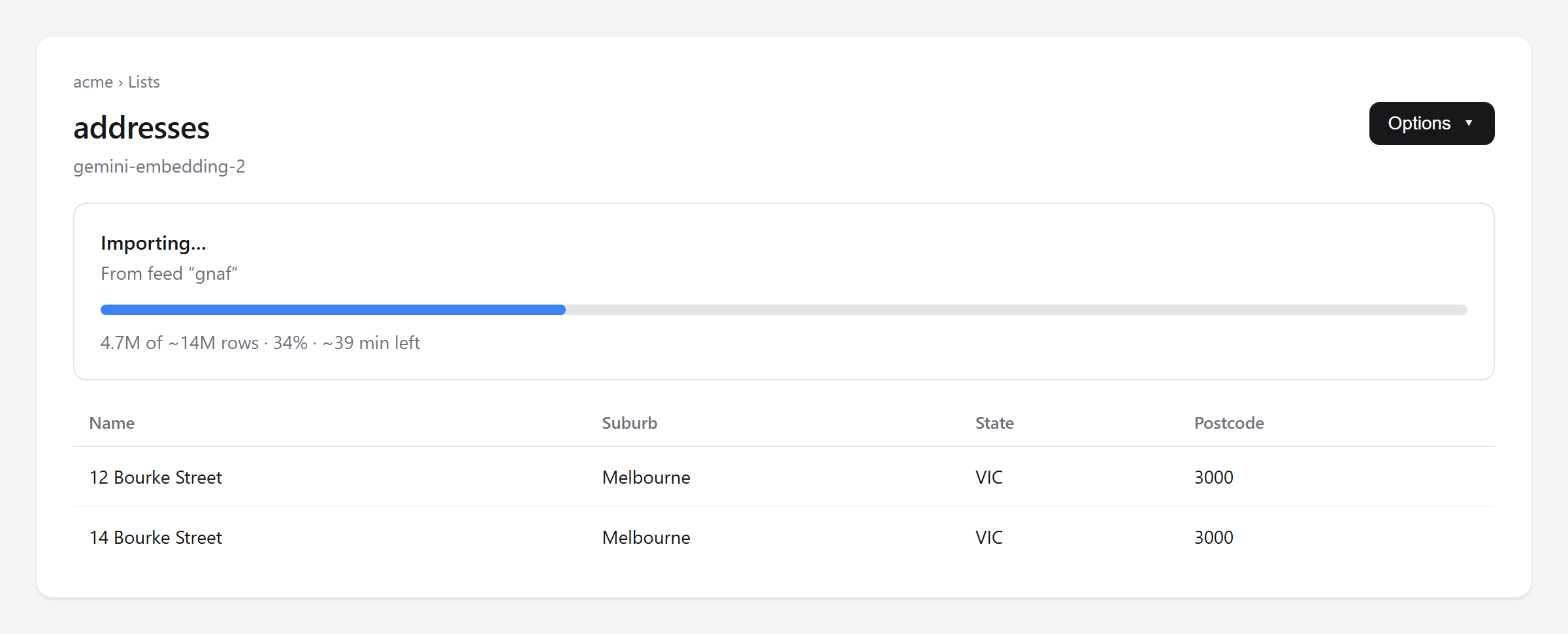
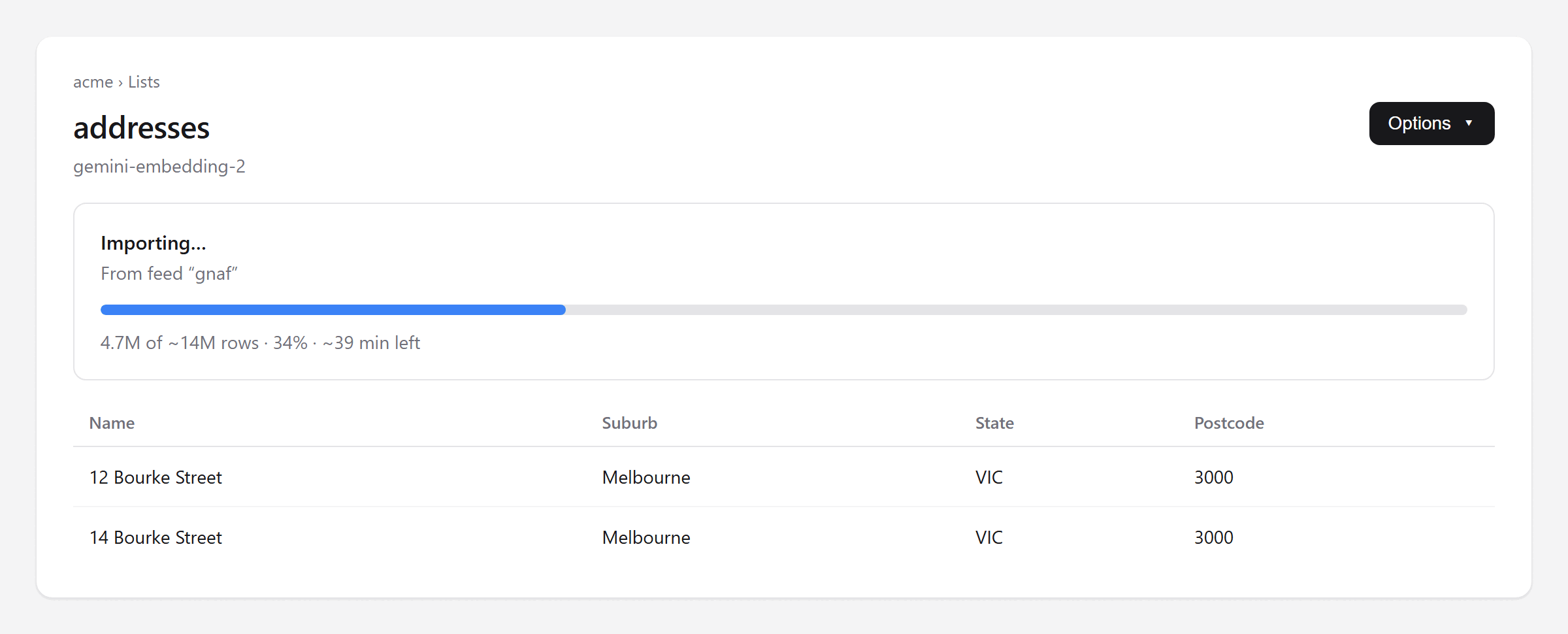
While an import is in flight, the list page shows how far through the file it is, with an estimate of the time left. A big file can take a while — this is what tells you it is moving rather than stuck. The progress belongs to the import, not to your browser: close the tab, come back tomorrow, and the bar picks up wherever the import has got to.
The percentage is measured in rows imported when the import knows how many rows it is writing — a file read in one go is parsed before any of it is indexed, so it knows exactly. A file big enough to be streamed has no row total until the whole file has been read — which is the slow part — so it counts bytes of the file read instead, and its row figure is an estimate that says so with a ~.
Look back at what happened
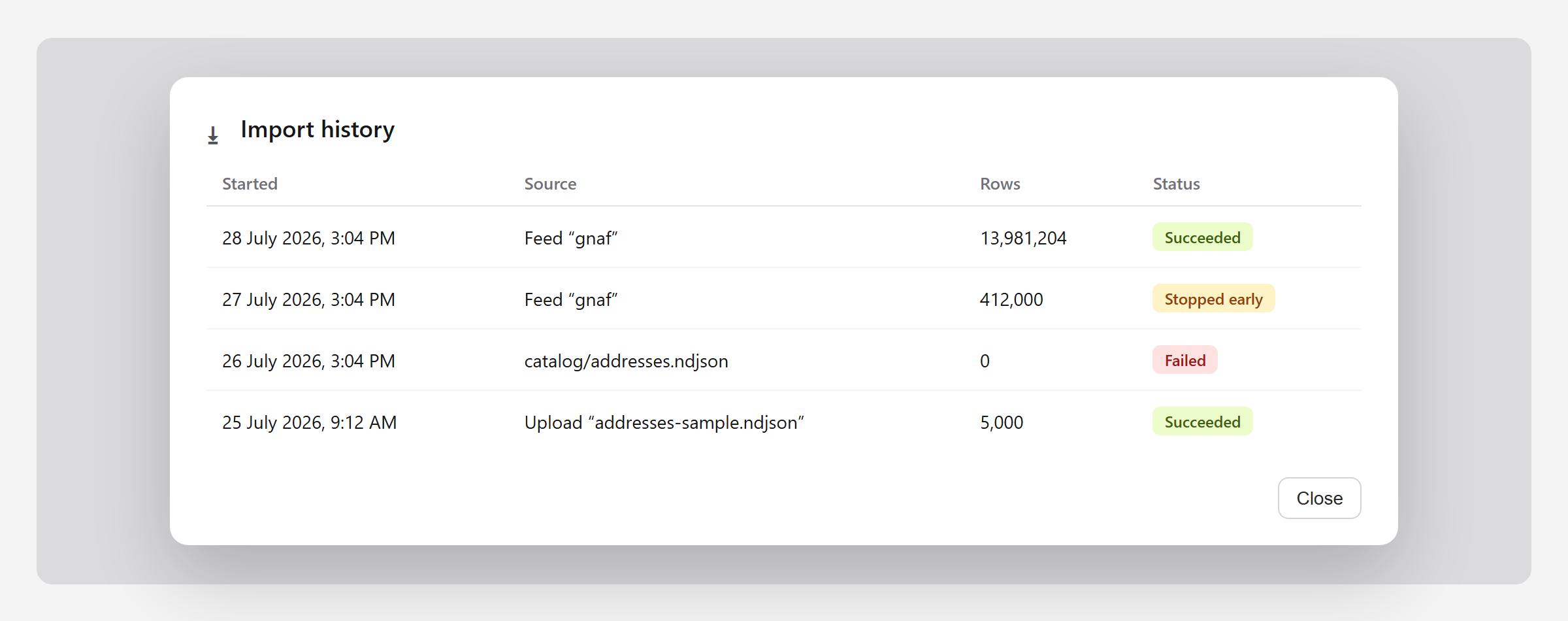
The history lists every import into this list, newest first, with where it came from, how many rows landed and how it finished. This is the part that is worth having weeks later, when someone asks why a product disappeared: you can see whether an import ran, and what it did.
Open one run for the detail
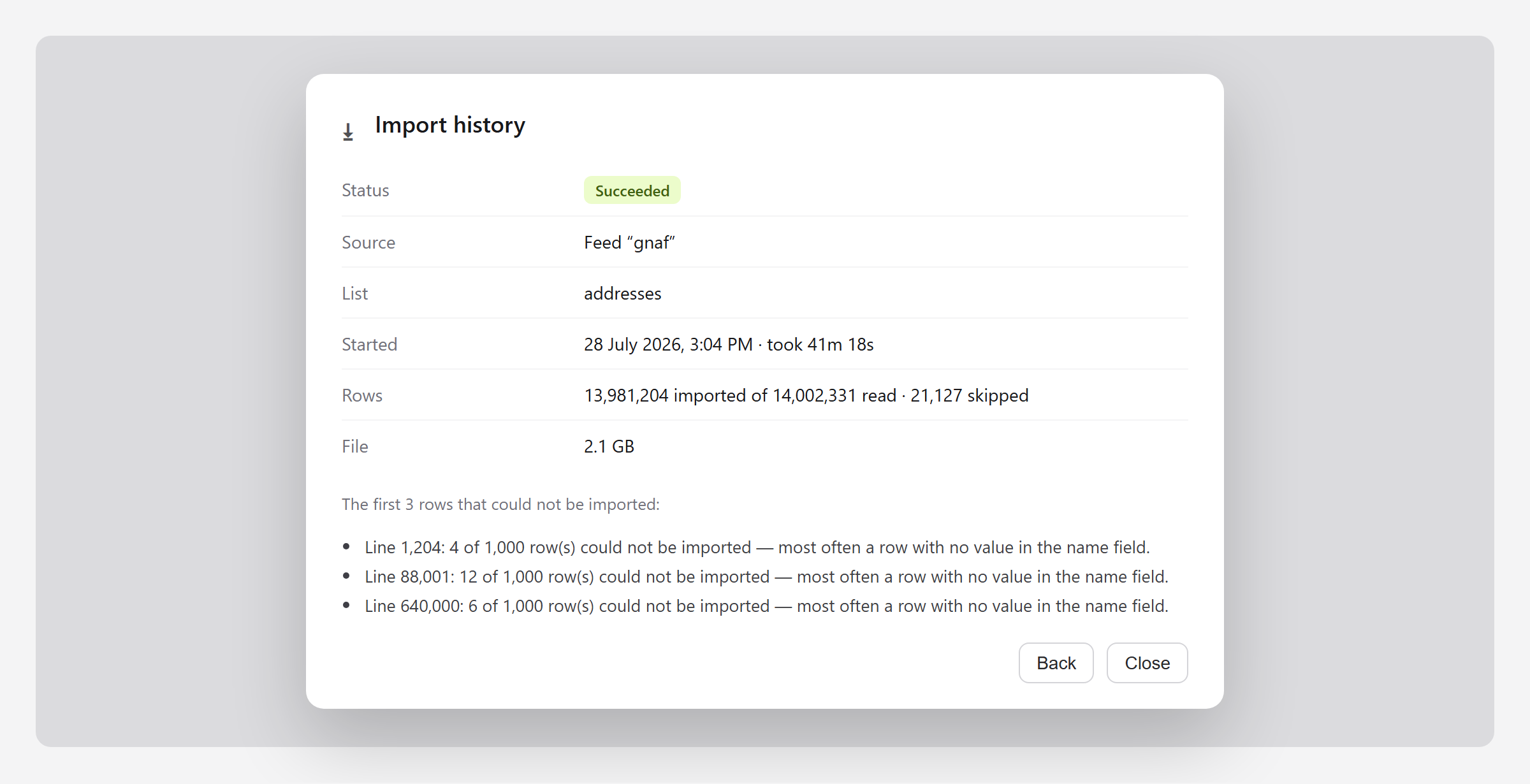
Pick a run to see its counters: rows read from the file, rows imported, and rows that could not be used. A healthy import usually loses a few rows — a blank name here and there — and the run keeps a sample of where, with line numbers, so you can open your file at the right place instead of hunting.
A file that is going nowhere is stopped early
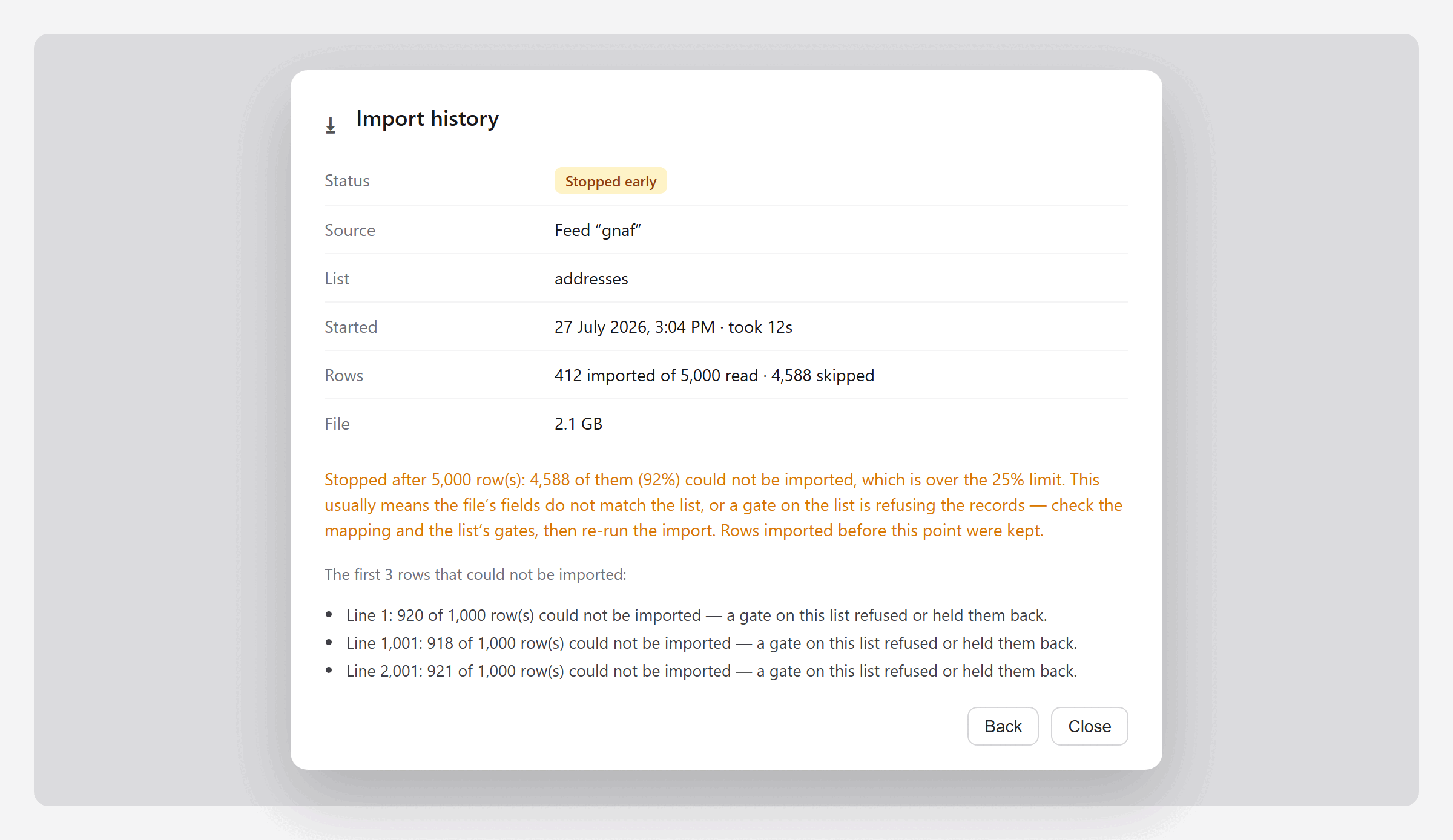
If a file starts losing most of its rows — the fields do not match the list, or a gate is refusing the records — the import is stopped in the first few thousand rows rather than spending an hour proving it. The run reads Stopped early, in amber rather than red: nothing broke, the platform read enough to judge the file and chose not to grind through the rest.
Rows imported before that point are kept. Stopping is not a rollback. Fix the mapping or the gate and run the import again — re-importing the same records is harmless.
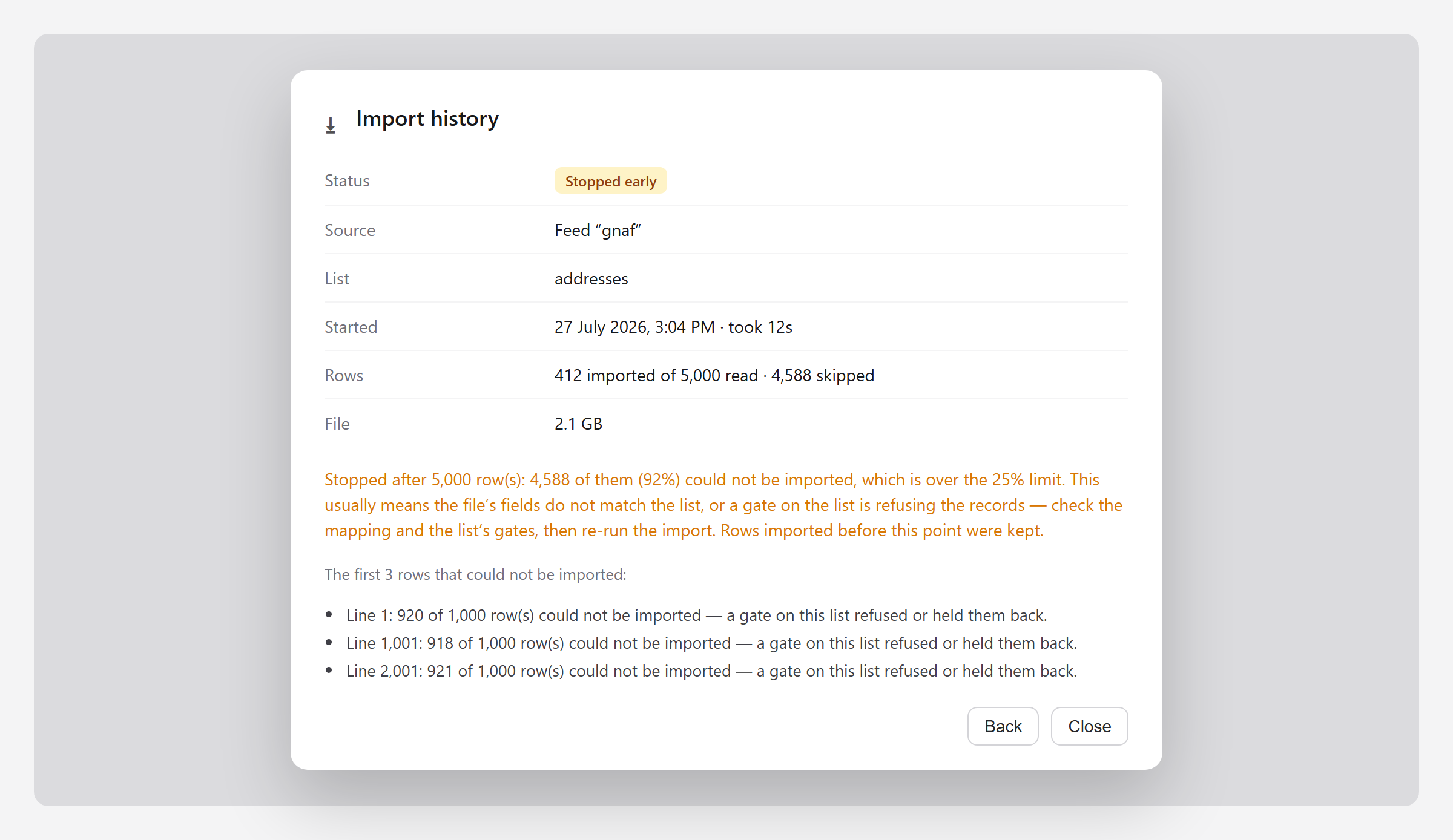
Feeds link to their last import
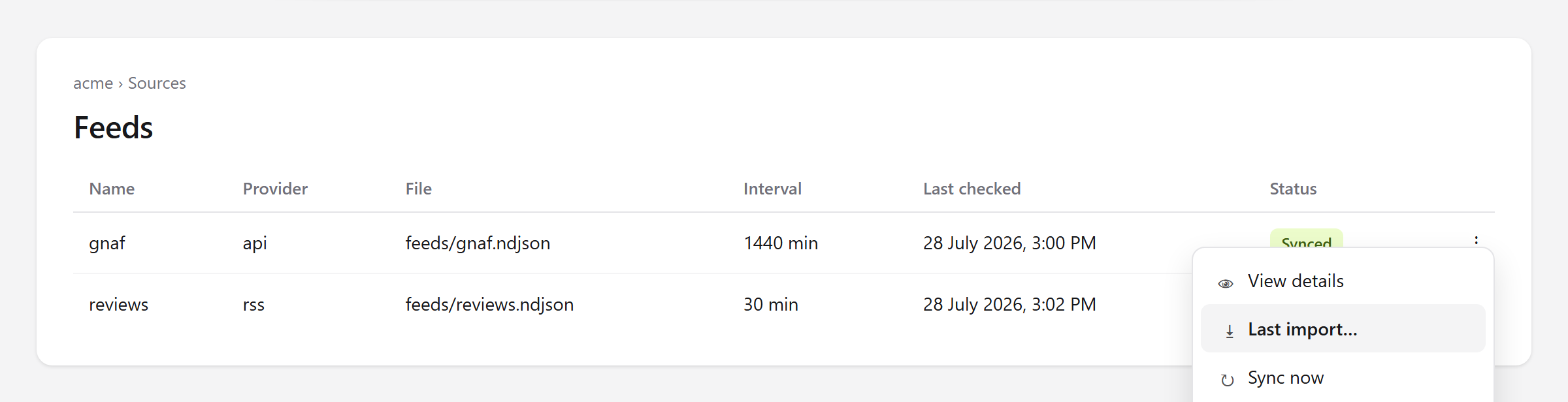
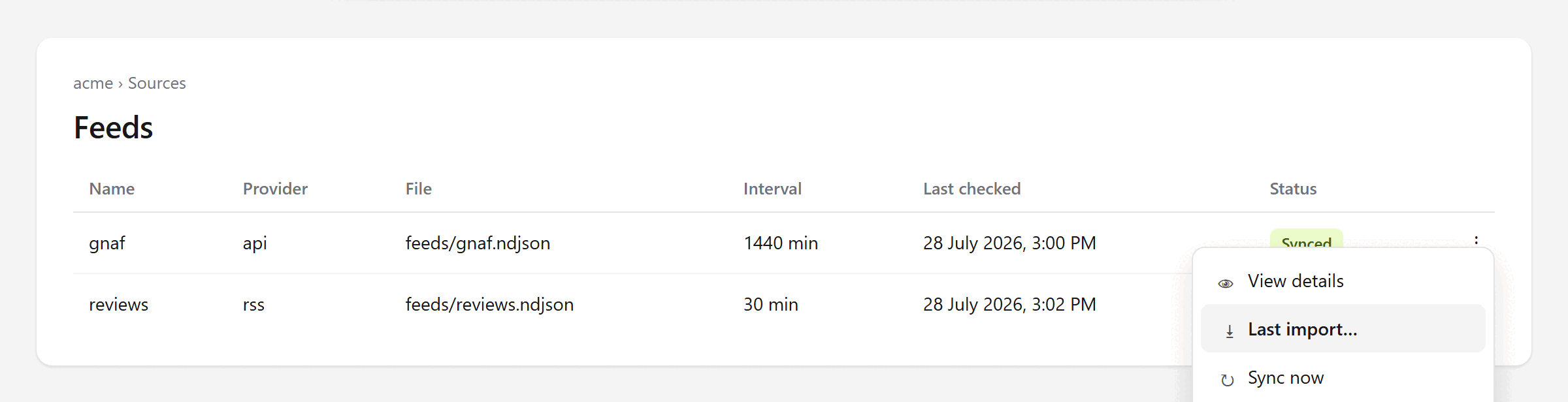
A feed's job is to keep its file current; making that file searchable is the import's job. They can disagree — a feed can sync perfectly into a file the import then refuses. The feed row's ⋮ menu has Last import, which opens the run that consumed its file, so “the feed says synced but the records look wrong” is one click to answer.
Automatic imports also speak up now. If one fails for a reason that will not fix itself — a file that cannot be parsed, a file over the size limit, a run stopped early — the account owner is emailed. Once per problem, not once per retry: a broken file that is retried every fifteen minutes does not email you every fifteen minutes.
File formats
- JSON — a single array of records.
- NDJSON — one record per line, what a feed produces.
- Delimited text — CSV and similar, columns separated by a character.
- The separator comes from the contents, not the name — comma, semicolon, pipe, tab; the
.csv,.psv,.tsvand.tabendings. A.csvholding tab-separated data imports correctly, and a separator read wrongly shows in the confirm step as one column of run-together text. - Size changes none of it. A delimited file too large to read in one piece is read in pieces — same separator, columns and rows — so a large
.csvor.psvlinked with keep in sync re-imports itself like any other. - Only a single JSON array has an upper size, because it is read whole. Save it as NDJSON if it is bigger.
Gzipped files
Any of those formats can arrive compressed with gzip — addresses.csv.gz, products.ndjson.gz — and imports exactly as the uncompressed file would: same separator detection, columns, field roles and rows.
- The first two bytes decide it, not the name. A
.csvthat is really gzipped imports; so does a.gzthat is really plain text. - Stored size is not expanded size. A store lists a compressed file at its stored size, and the file is read as it expands, so size is no limit — but the progress bar measures the stored file.
- A file too big to import as it stands is converted first: Convert to feed format… on its row rewrites it one record per line, which imports with no size limit.
- The field preview expands it too. One that expands past what the preview holds is read from its start and says so.
- Gzip only. A
.zipisn’t read.
Before the import runs: your rows
The confirm step opens with the first twenty rows as records, already through the changes the import will make — renamed columns, rows split into records, a lat/lng pair read as a position.
- The name column comes first, marked as such. Where nothing names the record there is none, and the notice underneath asks you to choose or build one.
- A column set to Not created is struck through as soon as you set it.
- The first rows, in file order, not a sample across the file. Long values are shortened with an ellipsis (…); a blank shows as a dash.
Before the import runs: confirming the fields
When an import will create fields, every column is listed under those rows with a few real values, the role it would get — searchable, facet or resource — and why. Change any, or set one to Not created, then import.
- A field’s role is fixed once it is created.
- The step appears only when there is something to decide. An import creates missing fields and fills existing ones, never changing a role; a guessed type only ever changes to text (below). A later import goes straight through; a file with a new column brings it back for that column alone.
- A facet’s type is guessed from its values. Digits with a leading zero —
0800,007,0412345678— make the column text, so postcodes, phone numbers and ids keep the zero. The reason says so. - Every value in the sample must fit. The sample is the whole file, or the first 1,000 rows of a file too large to read at once. A column becomes a number, date or true/false only if every value in it is one; a single
12Amakes it text, and the reason names that value. - A value after the sample that doesn’t fit —
12Ain a number column — changes a guessed column to text and imports the file again from the first row, so no value is lost. The run lists the change, and afacet.type-changedwebhook fires. - Declaring a type instead: send
field_typeswith the import —{ "postcode": "string" }— or"types"in a common-format manifest. Types arestring,number,dateandboolean. A typed column becomes a facet of that type, with no guess; it applies when the facet is created and never changes an existing one. - A type you chose (
field_typeon Fields, orfield_types) is never changed: the import stops and names the field, the row and the value. on_type_mismatchon the import request or the connection:widen(default, as above),fail(always stop) ordrop(leave the value out and count it on the run). In the console it is under Advanced in the import dialog and in Change connected file.- Fixing a facet that is already a number: change its type to String. No re-import: each record keeps the value it was imported with, so
0800comes back.
Three kinds of row cannot be changed, and say so:
- Already on this list — filled, never changed.
- Declared by the file — a common-format file states its own field roles.
- Location —
latitudeandlongitudeare the record’s position, searched by distance, not a field, so no facet or searchable is created for them.
A column holding several values in one field — ["Catching Fire", "Mockingjay"] — imports as one field holding the whole list, and says so:
- Facet (many values per record) — one record, each value filterable on its own. Right for tags.
- Split into records — at the top, under should each value be its own record?. Pick the column; splitting re-reads the file and redraws the step, and Keep one record per row puts it back. It multiplies your record count, counting towards your plan.
- Nothing guesses which you meant.
Columns that can’t be kept at all
- Grouped details rather than plain values —
line_items,rooms,variants, anything shaped like[{ "size": "double" }, { "size": "twin" }]— cannot be stored as a column, and are left out. The confirm step says so before the import runs; making each its own record is the only way to keep them. - A column nothing would be created for is listed too, with why — giving it a role rescues it.
- The step needs a person to answer it: a feed sync or automatic re-import keeps to the guess and reports what it created afterwards.
A file too large to read whole
- The confirm step still appears, rows and all, but the preview reads the start of the file; each role’s reasoning carries the row counts it was decided from.
- Whether a column becomes a facet depends on how often its values repeat, so the guess is made from the rows read. Whatever you set is used exactly as you set it.
- Columns appearing only later in the file are not on the screen, and are created on the usual guess when the import reaches them.
- A single JSON array has no meaningful first part, so it gets no preview. It says so, and names the fix: save it as NDJSON, one record per line.
- From the API, without the dialog: send
field_roles(andfield_types) with the import, or a common-format file that declares them.
Leaving a column out
Set a column’s role to Not created and the import does not take it: the field is never created, and its values are not stored on any record.
- A field that already exists cannot be excluded — those rows are locked, and a matching column arrives whatever you choose. Removing a field is a change to the list, and drops that value from every record already stored.
- It does not go back. Rows imported while a column was left out keep nothing from it. Giving it a role later fills the field from that point on; earlier records stay blank until you import them again. The confirm step says so beside the count.
- A list that keeps its file in sync repeats your answer. The choices are stored with the binding. Change them by importing the file again with Keep in sync on.
- A file can declare it itself, which is how a feed does it — there is no dialog on a sync:
{ "searchstack_format": 1, "fields": { "udprn": "excluded", "postcode_type": "excluded" } }Saying a column holds a list
One column, many values: Music, Comedy, Drama is three genres, not one.
- Set that column’s role to Facet (many values). The import creates a facet that holds more than one value per record and splits each cell on commas.
- Nothing guesses it — you have to set the role.
- The field is created on the first import that declares it; earlier records keep one value each until you import them again.
- A file can declare it too, the only way a feed can. Without the declaration a feed’s list column arrives as a plain facet holding one long value.
{ "searchstack_format": 1, "fields": { "genres": "facet_list", "cast": "facet_list" } }A column the name is built from
Where a gate builds a record’s name from one whole column — a template of just {address_label} — name and column hold the same text, so the column is created as a resource: returned with every result, but not searched a second time.
- That column only, and only when every value matches. A name built from several columns is a value none of them holds, so all stay searchable; so does a column matching on most rows but not all.
- Set the role yourself. The confirm step shows it on Resource with the reason; change it to Searchable to be matched separately, or Facet to filter on it exactly. A common-format file declaring
"postcode": "facet"does the same with no dialog — the file always wins. - Or use the column as the name instead of copying it. A template of one whole column is the Name field written the long way: a name field moves the column, a template copies it. The confirm step offers the move as you type such a template.
- This decides what an import creates; a field already on the list is filled as it stands.
Where to find it
- Open a list, then Import history on the Options menu. Every import is there, newest first, with source, row count and status. Pick one for its counters and anything it could not use.
- While an import runs, the list page carries a progress bar above the records. It reads from the run, not your browser, so closing the tab loses nothing.
Between pressing Import and the progress bar
- An import is put in a queue, not run on the spot: usually a few seconds before a background process picks it up and the bar appears.
- The dialog stays up for that wait and says so, then closes itself the moment the import really starts. Close it earlier if you like — the import is queued either way.
What a run tells you
| Field | Means |
|---|---|
| Source | Which feed, media-store file or upload the records came from. |
| Status | Running, Succeeded, Failed, or Stopped early — which covers a run the platform gave up on and one you stopped yourself. The run says which. |
| Rows | Read from the file, imported into the list, and skipped or refused. |
| File | The file’s size, when the store reported one; “Unknown” when it did not, in which case the run shows a row count and no percentage. |
| First affected lines | A sample of the rows that could not be imported, with line numbers. |
What the import dialog reports afterwards
When an import has something to tell you, the dialog stays open and says it in a line or two.
| The dialog says | What it means |
|---|---|
| Created n fields | The fields the import made, and the role each was given. |
| Flattened n single-value array fields into columns | A field holding an array of exactly one item is unwrapped, and that item’s own values become fields in their own right. A location holding one object becomes location_lat, location_lng. |
| Skipped n fields that can’t be stored as columns | A list of grouped details has no single value to store. You see this only where the confirm step was skipped, or you kept one record per row. |
| Dropped values that were too long or invalid | Facet values are limited to 256 characters; searchable and resource values to 2048. The record is still imported — only the oversized value is left off it. |
| Dropped n rows that had no name | Every record needs a name. The link goes to the gate that builds one from your other columns. |
Progress, and the estimate
- Rows imported, when the import knows its row total. A file small enough to read in one go is read in full first, so the total is exact:
25,000 of 100,000 rows. - Bytes of the file read, when it does not. A file read a little at a time knows no row total until the end, so the row figure beside the bar is estimated and carries a
~. - Time remaining appears once the import is 2% in.
When an import is stopped early
Once a few thousand rows have been read, a run where more than a quarter of them could not be imported is stopped early, and says why.
- Rows imported before the stop are kept. Fix the fields (or the gate refusing the records) and run the import again — re-importing the same records is harmless.
- It counts rows that could not be used — rows with no name, and rows a gate refused or held back. A row imported with one long value cut short is a warning, not a loss, and never counts.
When an import was interrupted
An import also reads as Stopped early when the server running it was interrupted — a restart, or the machine being moved. The run says so, and rows imported before the interruption are kept.
- A feed or keep-in-sync file re-imports on its own at the next check; a one-off upload has to be uploaded again.
- Import again, on the run — reached from the list’s connections panel or a feed’s Last import — repeats it now: same file, the settings the list holds, picking up from the rows already loaded.
- It appears only where the import can honestly be repeated: not on one that succeeded, not on a one-off upload (the file is not stored), not once the list points at a different file.
- A linked file interrupted twice in a row emails the account’s owner; the first time does not, since the re-import usually fixes it. An interrupted upload is emailed the first time — nothing will retry it.
Stopping an import yourself
- Where. Stop importing is on the progress panel on the list page while a run is going, and in Import history at any time — before a sync as well as during one.
- How fast. Within a few seconds: it checks between batches, not rows, so it finishes the batch it is on, then ends — recorded as Stopped early with your name against it.
- It is a pause on the list, not a cancel on one run. Until you resume, nothing imports into that list: no upload, no feed sync, no automatic re-import of a changed media-store file.
- Rows already imported are kept, so a file that replaces your records wholesale will have replaced some of them.
- Resuming does not re-run it. Resume clears the pause; a stopped import never counted as done, so a feed or linked file re-imports at its next sync.
A stopped list says so on its own page, naming who stopped importing and when, with Resume imports — also in Import history.
Where a record’s name comes from
Every record needs a name. The import works it out in this order, stopping at the first answer:
- the Name field you set, if you set one
- a column called
name,title,label,display_nameorheading - a gate that builds one from the row’s other columns
A row with no answer is skipped and counted in the run’s skipped total. If no row in the file has one, the import is refused outright.
When the file has no name column
Uploading a file, the confirm step tells you before anything is created:
- One box, and a button per column. Click one, or several to build a name —
{building_number} {thoroughfare}, {post_town}. Suggest one for me drafts it from your columns. - You see the names your records would carry first. Building from several columns creates the gate, adds it to the list and runs the import in one step.
- One whole column is offered as a move, not a build — Use
postcodeas the name. Building copies it, leaving name and column identical; moving makes it the name, and it leaves the field table below. Taking the move re-reads the file. - The block then names the column used and what records would be called; typing in the box gives the column back.
On a feed there is no dialog. The sync fails, the account owner is emailed and it shows in the console — once per problem rather than once per sync. The message names the columns the file actually has:
None of the 1000 row(s) have a name, so nothing could be imported. Records need a name, title, label, display_name or heading field. This file’s columns areaddress_label,postcode,state,locality_nameand 12 more. Either set the name field to one of them, or add a gate that builds a name from several of them.
- Add a gate that builds the name and the next sync succeeds. Or set a Name field: re-import the synced file once from the console with it chosen, and every automatic sync reuses it.
- From the API or MCP the refusal is a
400whose error response carries"code": 35. Check the code, not the wording. Codes31,33,35,36,37and22all mean the same request will fail identically until something changes — stop retrying. - Posting records directly reads
nameonly:title,label,display_nameandheadingare recognised while a file is read, and a bulk insert’s refusal says so. Send the name asname, or import the data as a file.
Building a name from several columns
Write the name as a pattern of the columns the row does have: {building_number} {thoroughfare}, {post_town}, {postcode}.
- Blank columns drop out with the separator beside them: a row with no building number reads
Fettercairn Rise, London, W1A 7AE, not, Fettercairn Rise, London, W1A 7AE. - Rows that already have a name keep it — the gate only fills the gaps. See gates for the full behaviour.
- A column used as the name is still a column. Setting Name field to
postcodenames every record from it and leaves the column where it is. No field is created from it unless you ask: the confirm step shows the row set to Not created, because the values are already stored as the name. Set a role there to have it as a field too.
Automatic imports now speak up
A list linked with keep-in-sync re-imports quietly whenever the file changes.
- A file that cannot be read, a file over the size limit, or a run stopped early emails the account owner and shows in the console.
- Once per problem, not once per retry. A broken file retried every fifteen minutes does not email you every fifteen minutes; fix it, and the next failure is news again.
The connection: change it, disconnect it, or run it now
A list kept in sync holds a connection to one file. It can be read and changed, and disconnecting it does not touch the records.
- Disconnect feed breaks the link between the list and the file. Its records stay exactly as they are — deleting the list is the other thing.
- Sync now re-imports immediately instead of waiting for the fifteen-minute sweep. For a store that reports no file timestamps this is the only way the list ever updates.
- A narrow edit changes the store, the file path, whether missing fields are created, the column roles and the split column. Pointing it at a different file makes that file import on the next sweep.
- While a connection creates missing fields, the list’s fields cannot be edited by hand — the next import would put them back. Turn Create missing fields off, or disconnect the feed, and they open again.
- On the list’s connections panel, and on the API as
list/{account}/{list}/source.
The column that identifies a record is chosen once
Every record has a key. It is the column you declare as the id, or — if you declare none — the record’s name.
- An import that would move it is refused, in either form. Changing the key gives every record a new identity, so the next import would write a second copy of the list beside the first rather than updating it. Import into a new list instead.
- An import that declares nothing inherits what the list already uses. Without that, a file that merely gained a
titlecolumn would re-key every record on the next unattended sync. - Declare it on the confirm step, as
id_field, or as an"id"role in a common-format file. - A record added by hand needs the same key. On an id-keyed list Add search result asks for the Id, and create takes it as
id; a record added without one is keyed by its name, where the next import cannot find it. On a name-keyed list anidis refused for the same reason.
Feeds and imports are two different jobs
A feed can sync perfectly into a file the import then refuses. The feed row’s ⋯ menu has Last import — the run that consumed that feed’s file, and the first place to look when a feed says Synced but the records look wrong.
Snapshot files: what is not in the file is removed
- A file can declare itself a snapshot: the complete truth about a list, not a set of changes. Records it no longer contains are removed after the import.
- No size limit. Each record remembers which import last wrote it, so the platform asks for “everything this run did not write” directly.
- An update-only file, with no snapshot declaration, never removes anything.
Read imports from the API
GET import-run/{account}lists runs, newest first; addlist_namefor one list’s history.GET import-run/{account}/{run-id}reads one run: state, rows,error_message, andwarnings— what a file could not give although the run worked (an indexed document with no text, or one that could not be read).- MCP tools:
import_run_list,import_run_get.
Importing from your own Azure storage
POST search-result/{account}/{list}/import takes a link and a file_name.
- The link is read as a container:
file_nameis appended to it as the blob’s path. - Send a container SAS (
sr=c) with read permission. A blob SAS (sr=b) is refused. - A file that cannot be downloaded (expired SAS, wrong path, 403) is recorded as a Failed run with the storage error, and the usual failure email is sent.
The connection is on the API, at list/{account}/{list}/source: read it, edit it narrowly, delete it to disconnect the feed, or POST .../source/sync to import now. The same four are MCP tools.